Azure / Azure/azure-quickstart-templates
Broken quickstart template doesn't create expected files when creating project in Visual Studio
- Dominant language
- Bicep
- Stars
- 14.9k
- Forks
- 16.2k
- Avg merge
- 6d 21h
- Merged PRs (30d)
- 6
Description
[microsoft.logic/logic-app-and-function-app](https://github.com/Azure/azure-quickstart-templates/tree/master/quickstarts/microsoft.logic/logic-app-and-function-app)
This template is referenced by the following documentation page, so customers will have problems if they try to follow the doc steps, which should reflect the current template name when the updated doc is published after 07/15/2021:
https://docs.microsoft.com/azure/logic-apps/create-serverless-apps-visual-studio
## Issue Details
### Repro steps
1. In Visual Studio 2019, create an Azure Resource Group project.
2. When prompted for a template, select the Azure Quickstart template named `logic-app-and-function-app`, which is located here:
https://github.com/Azure/azure-quickstart-templates/tree/master/quickstarts/microsoft.logic/logic-app-and-function-app
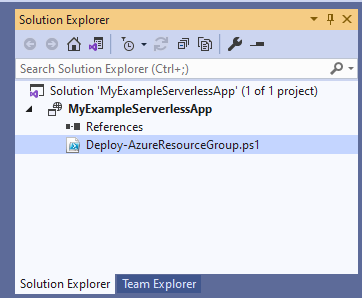
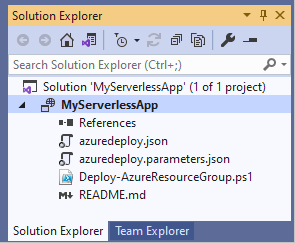
3. After you provide other project creation details and select **Create**, Visual Studio creates a solution and project. However, the project contains only the `Deploy-AzureResourceGroup.ps1` file:
**Actual**
**Expected**
CC: @PhaedrusM42
Contributor guide
No contributing guide indexed for this repository
Research direction
Start by reproducing the issue in Visual Studio 2019 with quickstarts/microsoft.logic/logic-app-and-function-app and compare the generated project with the template contents. Check why only Deploy-AzureResourceGroup.ps1 is created; done means the project contains the expected template files and matches the documented create-serverless-apps-visual-studio workflow.
Written by the indexing model from the issue text.
Assessment
- Tech stack
- azure, powershell
- Domain
- cloud, devtools
- Issue type
- Bug
- Difficulty
- 3/5
- Estimated time
- 1-2 days
- Activity status
- Stale
- Clarity
- Mostly clear
- Newbie friendliness
- 35/100