Azure / Azure/azure-powershell
Get-AzureRmMetric for SQL Database returns floored data
- Dominant language
- C#
- Stars
- 4.8k
- Forks
- 4.3k
- Avg merge
- 2d 17h
- Merged PRs (30d)
- 51
Description
### Cmdlet(s)
Get-AzureRmMetric
### PowerShell Version
5.1.15063.674
### Module Version
4.4.1
### OS Version
10.0.15063.674
### Description
The value returned by Get-AzureRmMetric for 'storage_percent' for Azure SQL Database seems to be floored when compared with Azure Portal.
`
PS E:\Weekly Health Check Script> (Get-AzureRmMetric -ResourceId $resourceId -StartTime $startTime -EndTime $endTime -MetricNames $metricName -TimeGrain $timeGrain).Data
TimeStamp : 10-11-2017 07:34:00
Average :
Minimum :
Maximum : 14
Total :
Count :
`
When I checked in Azure Portal,
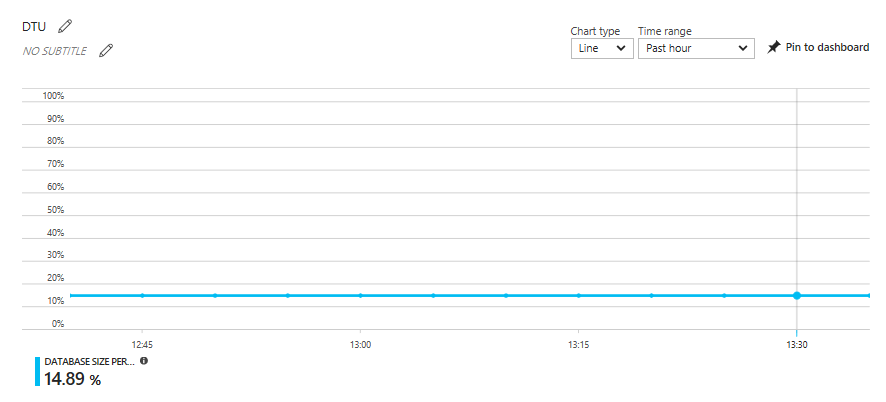
### Script/Steps for Reproduction
1. Create Azure SQL Database
2. `(Get-AzureRmMetric -ResourceId $resourceId -StartTime $startTime -EndTime $endTime -MetricNames 'storage_percent' -TimeGrain $timeGrain).Data)`
3. Check the result obtained from PowerShell and the one which is available in Azure Portal.
Contributor guide
Assessment
This issue has not been assessed yet.