Azure / Azure/azure-powershell
New-AzAutomationSoftwareUpdateConfiguration - Incorrect Linux Package Classifications.
- Dominant language
- C#
- Stars
- 4.8k
- Forks
- 4.3k
- Avg merge
- 2d 17h
- Merged PRs (30d)
- 51
Description
### Description
The Linux Package Classifications available via the Az.Automation module are Critical, Other, Security, Unclassified. Which is as documented here https://docs.microsoft.com/en-us/dotnet/api/microsoft.azure.commands.automation.model.updatemanagement.linuxpackageclasses?view=az-ps-latest.
If you try to create an update deployment via the Azure Portal there are only two options for Linux package classifications, as shown in the screenshot below.
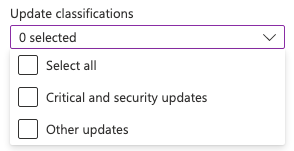
This is documented here https://docs.microsoft.com/en-gb/azure/automation/update-management/overview#update-classifications.
Looks to me that the update deployment functionality in Azure has been updated, but the Az.Automation PS module might've been missed?
Running the New-AzAutomationSoftwareUpdateConfiguration cmdlet with a one/several of the options in the enum (Critical/Other/Security/Unclassified) no errors are thrown however when you view the created update deployment it has no values selected for update classification.
### Issue script & Debug output
```PowerShell
$resourceGroupName = "myResourceGroup"
$automationAccountName = "myAutomationAccount"
$azureVmIds = @("/subscriptions/aSubscriptionId/resourceGroups/myResourceGroup/providers/Microsoft.Compute/virtualMachines/myVM", "/subscriptions/aSubscriptionId/resourceGroups/myResourceGroup/providers/Microsoft.Compute/virtualMachines/myOtherVM")
$sched = New-AzAutomationSchedule `
-ResourceGroupName $resourceGroupName `
-AutomationAccountName $automationAccountName `
-Name "exampleSchedule" `
-Description "Example Schedule" `
-StartTime "12:00Z" `
-ForUpdateConfiguration `
-DayInterval 1
$windowDuration = New-TimeSpan -Hours 2
New-AzAutomationSoftwareUpdateConfiguration `
-ResourceGroupName $resourceGroupName `
-AutomationAccountName $automationAccountName `
-AzureVMResourceId $azureVmIds `
-Schedule $sched `
-Linux `
-Duration $windowDuration `
-IncludedPackageClassification "Unclassified" `
-RebootSetting "IfRequired"
```
### Environment data
```PowerShell
Name Value
---- -----
PSVersion 7.2.6
PSEdition Core
GitCommitId 7.2.6
OS Linux 5.15.0-1017-azure #20~20.04.1-Ubuntu SMP …
Platform Unix
PSCompatibleVersions {1.0, 2.0, 3.0, 4.0…}
PSRemotingProtocolVersion 2.3
SerializationVersion 1.1.0.1
WSManStackVersion 3.0
```
### Module versions
```PowerShell
Name : Az.Automation
Path : /usr/share/az_7.5.0/Az.Automation/1.7.3/Az.Automation.psm1
Description : Microsoft Azure PowerShell - Automation service cmdlets for
Azure Resource Manager in Windows PowerShell and PowerShel
l Core.
For more information on Automation, please visit the follow
ing: https://docs.microsoft.com/azure/automation/
Guid : ef36c942-4a71-4e19-9450-05a35843deb6
Version : 1.7.3
ModuleBase : /usr/share/az_7.5.0/Az.Automation/1.7.3
ModuleType : Script
PrivateData : {PSData}
AccessMode : ReadWrite
ExportedAliases : {[Import-AzAutomationModule, Import-AzAutomationModule]}
ExportedCmdlets : {[Export-AzAutomationDscConfiguration, Export-AzAutomationD
scConfiguration], [Export-AzAutomationDscNodeReportContent,
Export-AzAutomationDscNodeReportContent], [Export-AzAutoma
tionRunbook, Export-AzAutomationRunbook], [Get-AzAutomation
Account, Get-AzAutomationAccount]…}
ExportedFunctions : {}
ExportedVariables : {}
NestedModules : {Microsoft.Azure.PowerShell.Cmdlets.Automation}
```
### Error output
```PowerShell
The cmdlet itself does not error, but it does not behave as expected. Please read description above for more information.
```
Contributor guide
Assessment
This issue has not been assessed yet.