Azure / Azure/azure-powershell
Update-AzCosmosDBAccount unable to disable virtual networks and firewall setting
- Dominant language
- C#
- Stars
- 4.8k
- Forks
- 4.3k
- Avg merge
- 2d 17h
- Merged PRs (30d)
- 51
Description
### Description
We tried to disable the virtual networks and firewall setting using Az Powershell.
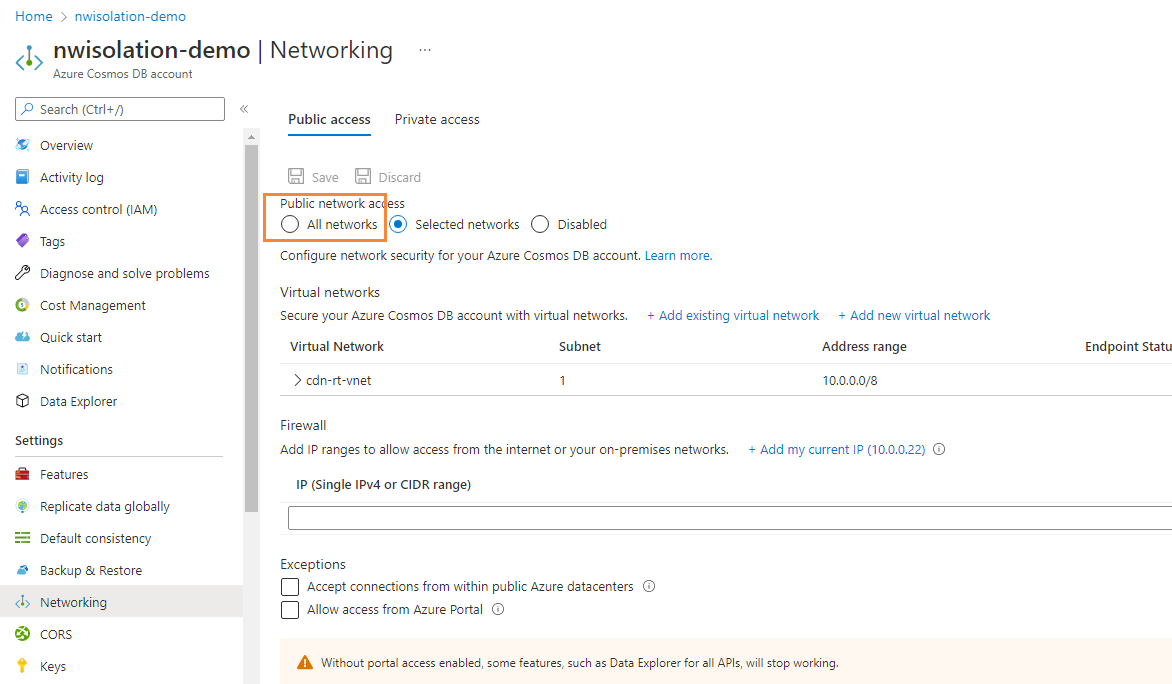
We tired below command first and it reported error:
> Update-AzCosmosDBAccount \`
> -ResourceGroupName "bo-private" \`
> -Name "nwisolation-demo" \`
> -EnableVirtualNetwork $false \`
> -PublicNetworkAccess "Enabled" \`
> -IpRule @() -Debug
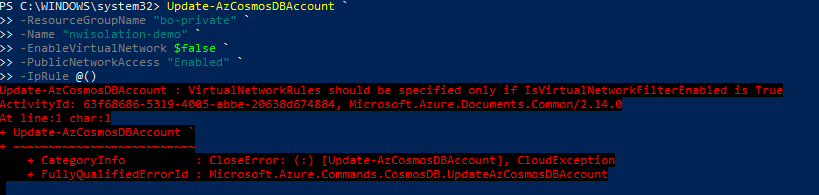
From the debug output, It looks like it has been rejected by service side due to the remaining virtual network rules:
> DEBUG: ============================ HTTP REQUEST ============================
>
> HTTP Method:
> PATCH
>
> Absolute Uri:
> https://management.azure.com/subscriptions/27cafca8-b9a4-4264-b399-45d0c9cca1ab/resourceGroups/bo-private/providers/Microsoft.DocumentDB/databaseAccounts/nwisolation-demo?api-version=2022-02-15-preview
>
> Headers:
> x-ms-client-request-id : b471dcc5-90df-4294-863c-8e12c736a08d
> accept-language : en-US
>
> Body:
> {
> "location": "West US",
> "properties": {
> "locations": [
> {
> "locationName": "West US",
> "provisioningState": "Succeeded",
> "failoverPriority": 0,
> "isZoneRedundant": false
> }
> ],
> "ipRules": [],
> "isVirtualNetworkFilterEnabled": false,
> "publicNetworkAccess": "Enabled"
> }
> }
>
> DEBUG: ============================ HTTP RESPONSE ============================
>
> Status Code:
> BadRequest
>
> Headers:
> Pragma : no-cache
> Strict-Transport-Security : max-age=31536000; includeSubDomains
> x-ms-gatewayversion : version=2.14.0
> x-ms-ratelimit-remaining-subscription-writes: 1199
> x-ms-request-id : d749c6fe-0ea2-429d-89d8-3a39c96ba65c
> x-ms-correlation-request-id : d749c6fe-0ea2-429d-89d8-3a39c96ba65c
> x-ms-routing-request-id : SOUTHEASTASIA:20220722T092817Z:d749c6fe-0ea2-429d-89d8-3a39c96ba65c
> X-Content-Type-Options : nosniff
> Cache-Control : no-store, no-cache
> Date : Fri, 22 Jul 2022 09:28:16 GMT
> Server : Microsoft-HTTPAPI/2.0
>
> Body:
> {
> "code": "BadRequest",
> "message": "VirtualNetworkRules should be specified only if IsVirtualNetworkFilterEnabled is True\r\nActivityId: b471dcc5-90df-4294-863c-8e12c736a08d, Microsoft.Azure.Documents.Common/2.14.0"
> }
>
> DEBUG: 5:28:17 PM - [ConfigManager] Got [False] from [EnableDataCollection], Module = [], Cmdlet = [].
With the intention to remove the virtual network rules, we tried below command, but it is still with no good.
> Update-AzCosmosDBAccount \`
> -ResourceGroupName "bo-private" \`
> -Name "nwisolation-demo" \`
> -EnableVirtualNetwork $false \`
> -PublicNetworkAccess "Enabled" \`
> -VirtualNetworkRuleObject @() \`
> -IpRule @() -Debug

The error this time seems to be parameter validation failure for "VirtualNetworkRuleObject", I am wondering whether the validation could be relaxed to accept an empty collection to delete all the virtual network rules?
### Issue script & Debug output
```PowerShell
PS C:\WINDOWS\system32> Update-AzCosmosDBAccount `
>> -ResourceGroupName "bo-private" `
>> -Name "nwisolation-demo" `
>> -EnableVirtualNetwork $false `
>> -PublicNetworkAccess "Enabled" `
>> -IpRule @()
Update-AzCosmosDBAccount : VirtualNetworkRules should be specified only if IsVirtualNetworkFilterEnabled is True
ActivityId: 5c791281-0cd4-4c01-a60a-813999fb6966, Microsoft.Azure.Documents.Common/2.14.0
At line:1 char:1
+ Update-AzCosmosDBAccount `
+ ~~~~~~~~~~~~~~~~~~~~~~~~~~
+ CategoryInfo : CloseError: (:) [Update-AzCosmosDBAccount], CloudException
+ FullyQualifiedErrorId : Microsoft.Azure.Commands.CosmosDB.UpdateAzCosmosDBAccount
```
### Environment data
```PowerShell
PS C:\WINDOWS\system32> $PSVersionTable
Name Value
---- -----
PSVersion 5.1.19041.1682
PSEdition Desktop
PSCompatibleVersions {1.0, 2.0, 3.0, 4.0...}
BuildVersion 10.0.19041.1682
CLRVersion 4.0.30319.42000
WSManStackVersion 3.0
PSRemotingProtocolVersion 2.3
SerializationVersion 1.1.0.1
```
### Module versions
```PowerShell
PS C:\WINDOWS\system32> Get-Module Az*
ModuleType Version Name ExportedCommands
---------- ------- ---- ----------------
Script 2.9.0 Az.Accounts {Add-AzEnvironment, Clear-AzConfig, Clear-AzContext, Clear-AzDefault...}
Script 1.8.2 Az.CosmosDB {Get-AzCosmosDBAccount, Get-AzCosmosDBAccountKey, Get-AzCosmosDBCassandraKeyspace, Get-AzCosmosDBCassandraKeyspaceThroughput...}
```
### Error output
```PowerShell
HistoryId: 7
RequestId : 5b06cac1-9770-4531-a771-44786d9daf14
Message : VirtualNetworkRules should be specified only if IsVirtualNetworkFilterEnabled is True
ActivityId: 5973e475-8d6c-43bb-8c18-f4879f01de54, Microsoft.Azure.Documents.Common/2.14.0
ServerMessage : BadRequest: VirtualNetworkRules should be specified only if IsVirtualNetworkFilterEnabled is True
ActivityId: 5973e475-8d6c-43bb-8c18-f4879f01de54, Microsoft.Azure.Documents.Common/2.14.0 (System.Collections.Generic.List`1[Microsoft.Rest.Azure.CloudError])
ServerResponse : {BadRequest}
RequestMessage : {PATCH https://management.azure.com/subscriptions/27cafca8-b9a4-4264-b399-45d0c9cca1ab/resourceGroups/bo-private/providers/Microsoft.DocumentDB/databaseAccounts/nwisolation-demo?api-version=2022-02-15-preview}
InvocationInfo : {Update-AzCosmosDBAccount}
Line : Update-AzCosmosDBAccount `
Position : At line:1 char:1
+ Update-AzCosmosDBAccount `
+ ~~~~~~~~~~~~~~~~~~~~~~~~~~
StackTrace : at Microsoft.Azure.Management.CosmosDB.DatabaseAccountsOperations.d__23.MoveNext()
--- End of stack trace from previous location where exception was thrown ---
at System.Runtime.ExceptionServices.ExceptionDispatchInfo.Throw()
at System.Runtime.CompilerServices.TaskAwaiter.HandleNonSuccessAndDebuggerNotification(Task task)
at Microsoft.Azure.Management.CosmosDB.DatabaseAccountsOperations.d__6.MoveNext()
--- End of stack trace from previous location where exception was thrown ---
at System.Runtime.ExceptionServices.ExceptionDispatchInfo.Throw()
at System.Runtime.CompilerServices.TaskAwaiter.HandleNonSuccessAndDebuggerNotification(Task task)
at Microsoft.Azure.Commands.CosmosDB.UpdateAzCosmosDBAccount.ExecuteCmdlet()
at Microsoft.WindowsAzure.Commands.Utilities.Common.AzurePSCmdlet.ProcessRecord()
HistoryId : 7
```
Contributor guide
Research direction
Start at the Update-AzCosmosDBAccount entry point and locate validation for the VirtualNetworkRuleObject parameter, using the request and error output in the issue to understand the current behavior. Done means an empty collection is accepted and disabling virtual networks removes the rules without the service-side validation error.
Written by the indexing model from the issue text.
Assessment
- Tech stack
- azure, powershell
- Domain
- cli, cloud
- Issue type
- Bug
- Difficulty
- 3/5
- Estimated time
- 1-2 days
- Activity status
- Quiet
- Clarity
- Mostly clear
- Newbie friendliness
- 52/100