Azure / Azure/azure-powershell
Set-AzOperationalInsightsLinkedService cannot link Automation account.
- Dominant language
- C#
- Stars
- 4.8k
- Forks
- 4.3k
- Avg merge
- 3d 14h
- Merged PRs (30d)
- 54
Description
## Description
Log Analytics workspace and automation account cannot be linked in Set-AzOperationalInsightsLinkedService.
Set-AzOperationalInsightsLinkedService cannot link Log Analytics workspace and automation account.
However, in both cases, the Log Analytics Workspace and Automation Account cannot be linked.
## Steps to reproduce
```powershell
Set-AzOperationalInsightsLinkedService -ResourceGroupName '' -WorkspaceName 'LAWSname' -LinkedServiceName Automation -WriteAccessResourceId ''
```
## Environment data
```powershell
> $PSVersionTable
Name Value
---- -----
PSVersion 5.1.22000.65
PSEdition Desktop
PSCompatibleVersions {1.0, 2.0, 3.0, 4.0...}
BuildVersion 10.0.22000.65
CLRVersion 4.0.30319.42000
WSManStackVersion 3.0
PSRemotingProtocolVersion 2.3
SerializationVersion 1.1.0.1
```
## Module versions
```powershell
> Get-Command Set-AzOperationalInsightsLinkedService
CommandType Name Version Source
----------- ---- ------- ------
Cmdlet Set-AzOperationalInsightsLinkedService 2.3.0 Az.OperationalInsights
```
## Debug output
```
```
## Error output
- When log analytics workspace with pre-linked services
```powershell
> Set-AzOperationalInsightsLinkedService -ResourceGroupName 'dasasaki_rg' -WorkspaceName 'dasasaki-test' -LinkedServiceName Automation -WriteAccessResourceId '/subscriptions/11b4afdb-3329-42f2-b8dc-b26c5ac19146/resourceGroups/dasasaki_rg/providers/Microsoft.Automation/automationAccounts/dasasaki-test'
Set-AzOperationalInsightsLinkedService : HTTP Status Code: BadRequest
Error Message: 種類 'Microsoft.Rest.Azure.CloudException' の例外がスローされました。
Request Id: 910ac0d2-e865-4438-a68a-741ac2e99c23
Timestamp (Utc):11/01/2021 02:38:09
発生場所 行:1 文字:1
+ Set-AzOperationalInsightsLinkedService -ResourceGroupName 'dasasaki_r ...
+ ~~~~~~~~~~~~~~~~~~~~~~~~~~~~~~~~~~~~~~~~~~~~~~~~~~~~~~~~~~~~~~~~~~~~~
+ CategoryInfo : CloseError: (:) [Set-AzOperationalInsightsLinkedService]、CloudException
+ FullyQualifiedErrorId : Microsoft.Azure.Commands.OperationalInsights.Clusters.SetAzureOperationalInsightsLinkedS
erviceCommand
```
- When Log Analytics does not have a linked service
```
> Set-AzOperationalInsightsLinkedService -ResourceGroupName 'dasasaki_rg' -WorkspaceName 'dasasaki-bots2-for-ai' -LinkedServiceName Automation -WriteAccessResourceId '/subscriptions/11b4afdb-3329-42f2-b8dc-b26c5ac19146/resourceGroups/dasasaki_rg/providers/Microsoft.Automation/automationAccounts/dasasaki-test'
Set-AzOperationalInsightsLinkedService : linked service Automation for dasasaki-bots2-for-ai is not existed
発生場所 行:1 文字:1
+ Set-AzOperationalInsightsLinkedService -ResourceGroupName 'dasasaki_r ...
+ ~~~~~~~~~~~~~~~~~~~~~~~~~~~~~~~~~~~~~~~~~~~~~~~~~~~~~~~~~~~~~~~~~~~~~
+ CategoryInfo : CloseError: (:) [Set-AzOperationalInsightsLinkedService]、ArgumentException
+ FullyQualifiedErrorId : Microsoft.Azure.Commands.OperationalInsights.Clusters.SetAzureOperationalInsightsLinkedS
erviceCommand
```
## other info
I thought it was similar to #16093, but #16093 targets a cluster, so the code path is expected to be different from this command.
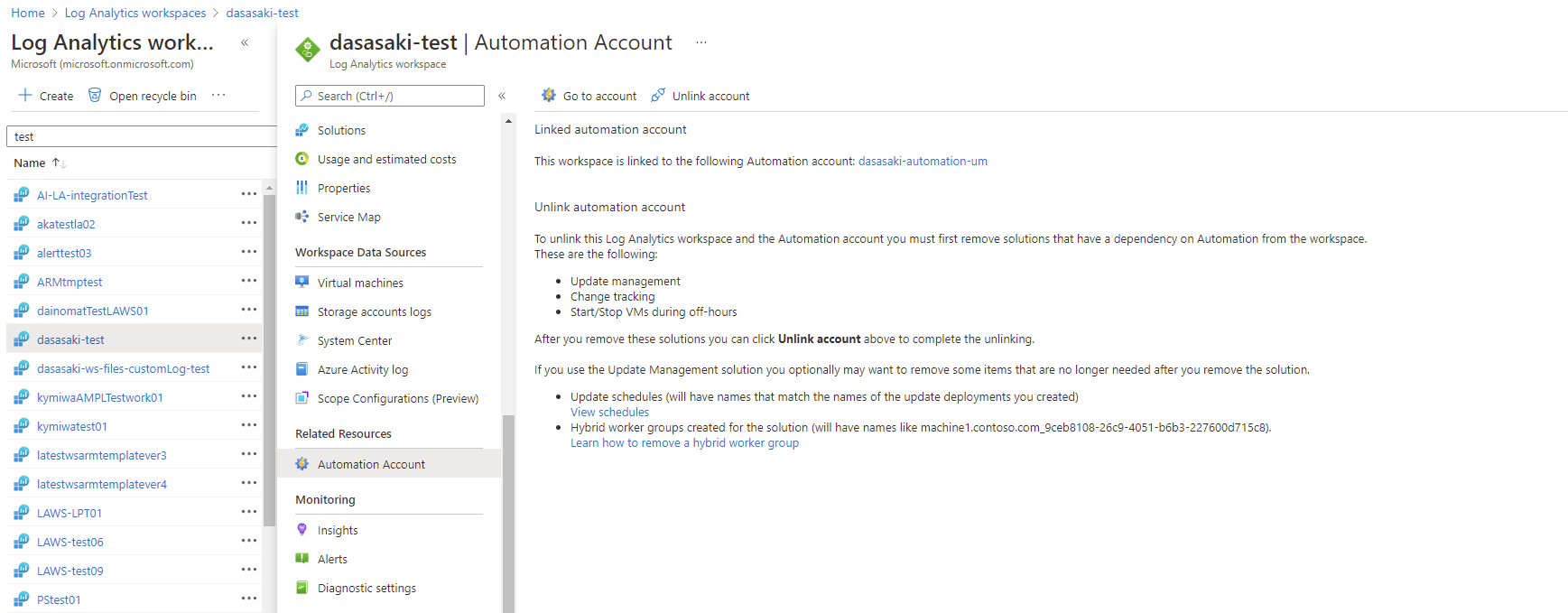
When linked, it will look like this.
Contributor guide
Research direction
Start by reproducing Set-AzOperationalInsightsLinkedService with the command and resource IDs shown in the issue, testing both a workspace with and without a linked service. Trace the command's implementation and compare the two reported errors; done means the Log Analytics workspace successfully links to the Automation account.
Written by the indexing model from the issue text.
Assessment
- Tech stack
- powershell
- Domain
- cloud
- Issue type
- Bug
- Difficulty
- 4/5
- Estimated time
- 3-5 days
- Activity status
- Stale
- Clarity
- Mostly clear
- Newbie friendliness
- 35/100