Azure / Azure/azure-functions-java-worker
Node.js client call to Azure Functions Java requires Content-Length header set using 'https' package
- Dominant language
- Java
- Stars
- 103
- Forks
- 74
- Avg merge
- 4d 8h
- Merged PRs (30d)
- 2
Description
When using a Node.js client app with the 'https' package, it requires the 'Content-Length' header to be set, otherwise the Azure Functions Java app will receive a 'null' body.
In contrast, using the same Node.js client and 'https' package to call a Azure Function written in dotnet/C# successfully receives the body without the 'Content-Length' header needing to be explicitly set on the client.
#### Repro steps
Provide the steps required to reproduce the problem:
1. Create a simple Node.js app. (See code below)
2. Use the 'https' npm package
3. Make a post call to the Azure Function (Java) without the 'Content-Length' header set.
4. The Azure Function (Java) receives a null body.
5. If you explicitly set the Content-Length, Azure Function (Java) receives the body.
6. Using the same Node.js app and calling to a Azure Function (C#) does not require the 'Content-Length' header set, and will successfully receive the body of the post request.
#### Expected behavior
Provide a description of the expected behavior.
- When posting to the Azure Function (Java) using 'https' npm package, the 'Content-Length' header should not need to be set, and the Azure Function should receive the body.
- This works as expected when calling Azure Function (C#), but does not work as expected when calling Azure Function (Java).
#### Actual behavior
Provide a description of the actual behavior observed.
- When posting using 'https' npm package, to Azure Function (Java), the function receives a 'null' body if the 'Content-Length' header is not set.
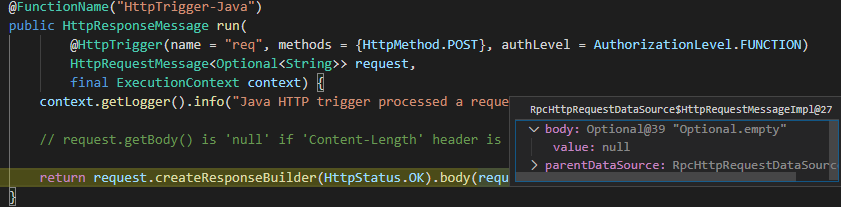
- When posting using 'https' npm package, to Azure Function (C#), the function successfully receives the body if the 'Content-Length' header is not yet.
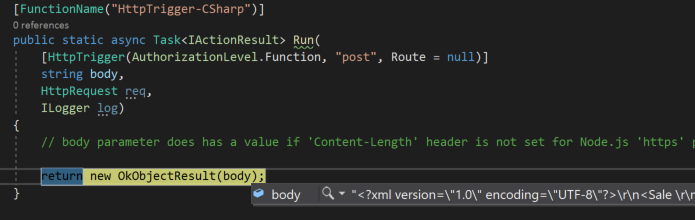
- The behavior is inconsistent between Azure Functions (Java) and Azure Functions (C#)
#### Known workarounds
Provide a description of any known workarounds.
- Manually setting the 'Content-Length' header on the 'https' Node.js request being posted to the Azure Function (Java) allows the request to be received on the function.
- This is not required when calling the Azure Function (C#).
#### Sample Code
Node.js Client App
```javascript
var https = require('https');
var xml = "\r\n\r\n";
// Using 'https' Library:
var options = {
host: '57c16559.ngrok.io',
port: 443,
path: '/api/HttpTrigger-Java',
//path: '/api/HttpTrigger-CSharp',
method: 'POST',
headers: {
'Content-Type': 'application/xml',
// Azure Function (Java) requires 'Content-Length' set, otherwise it receives a 'null' body.
// Azure Function (DotNet) doesn't require this, and successfully receives the body.
//'Content-Length': xml.length
}
};
var req = https.request(options, function(res) {
console.log("statusCode: ", res.statusCode);
console.log("headers: ", res.headers);
res.on('data', function(d) {
console.log(d);
});
});
req.write(xml)
req.end()
req.on('error', function(e) {
console.error(e);
});
```
Azure Function (Java)
```java
@FunctionName("HttpTrigger-Java")
public HttpResponseMessage run(
@HttpTrigger(name = "req", methods = {HttpMethod.POST}, authLevel = AuthorizationLevel.FUNCTION)
HttpRequestMessage> request,
final ExecutionContext context) {
context.getLogger().info("Java HTTP trigger processed a request.");
// request.getBody() is 'null' if 'Content-Length' header is not set for Node.js 'https' package.
return request.createResponseBuilder(HttpStatus.OK).body(request.getBody()).build();
}
```
Azure Function (C#)
```csharp
[FunctionName("HttpTrigger-CSharp")]
public static async Task Run(
[HttpTrigger(AuthorizationLevel.Function, "post", Route = null)]
string body,
HttpRequest req,
ILogger log)
{
// body parameter does has a value if 'Content-Length' header is not set for Node.js 'https' package.
return new OkObjectResult(body);
}
```
Contributor guide
Assessment
This issue has not been assessed yet.