Azure / Azure/azure-functions-host
Consumption Plan Linux - 0 functions loaded for .NET Core 3.1 Functions project
- Dominant language
- C#
- Stars
- 2k
- Forks
- 482
- Avg merge
- 2d 12h
- Merged PRs (30d)
- 38
Description
We've tested this behavior with a new clean .NET Core 3.1 Azure Functions project containing only a TimerTrigger function which executes every 5 minutes. When we deploy this functions to a Azure Function based on a Linux AppService plan the function is loaded correctly and the timer trigger is executed succesful.
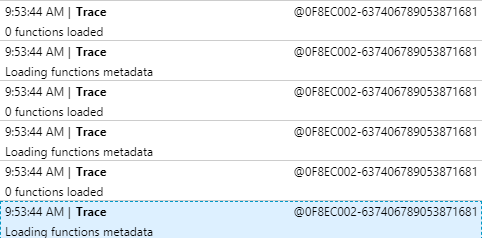
But when we deploy the same function to a Linux Consumption Plan we don't see the functions being loaded. And also a App Insights messages states that 0 functions have been loaded:
#### Investigative information
- Timestamp: 11-11-2020 09:53:44 AM (CEST)
- Function App version: 3.0.14916.0
- Function App name: function-linux
- Function name(s) (as appropriate): TimerTrigger
- Invocation ID: -
- Region: West Europe
#### Repro steps
1. Create new Azure Functions project in Visual Studio (.NET Core 3.1)
2. Add timer trigger function to the project
3. Create Function App based on Consumption Plan, Operating System: Linux
4. Deploy project
5. Look at functions in created function app and no function will show also AppInsights logging indicates: 0 functions loaded
#### Expected behavior
At step 5 I expect that the TimeTrigger function is loaded correctly
#### Actual behavior
Functions in created function app are not loading and AppInsights log indicated that 0 functions have been loaded
#### Known workarounds
Provide a description of any known workarounds.
Deploy the function on a Function App based on a AppService plan for Linux and it runs fine:

#### Related information
Code of the function;
Source
```csharp
[FunctionName("TimerTrigger")]
public static void Run([TimerTrigger("0 */5 * * * *", RunOnStartup = true)]TimerInfo myTimer, ILogger log)
{
log.LogInformation("It's working now!");
}
```
Contributor guide
Research direction
Start with the clean .NET Core 3.1 project containing the C# TimerTrigger shown in the report and reproduce deployment to a Linux Consumption Plan. Compare the deployment and Application Insights behavior with the Linux App Service plan, focusing on the reported “0 functions loaded” result. Done means the TimerTrigger is discovered and executes on the Consumption Plan.
Written by the indexing model from the issue text.
Assessment
- Tech stack
- azure, csharp
- Domain
- backend, cloud
- Issue type
- Bug
- Difficulty
- 4/5
- Estimated time
- 3-5 days
- Activity status
- Stale
- Clarity
- Mostly clear
- Newbie friendliness
- 35/100