Azure / Azure/azure-functions-host
Application insights doesn't show failed request
- Dominant language
- C#
- Stars
- 2k
- Forks
- 482
- Avg merge
- 2d 12h
- Merged PRs (30d)
- 38
Description
#### Investigative information
Please provide the following:
- Timestamp: 2020-08-17T06:45:10.850Z
- Function App version: v3
- Function App name: xxx
- Function name(s) (as appropriate): UnauthorizedTestTrigger
- Invocation ID: 34d91b83-abbf-4b2f-9ece-3a7f2ccef128
- Region: West Europe
#### Expected behavior
I would expect requests with a error status code (like 401) to be in the failed requests tab of Application Insights but they seem to be successful requests.
#### Actual behavior
Requests are marked as successful when they have an error status code.
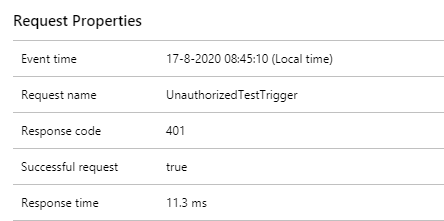
#### Known workarounds
I'm not aware of any workarounds.
#### Related information
See example below.
Source
```csharp
[FunctionName("UnauthorizedTestTrigger")]
public IActionResult Run(
[HttpTrigger(AuthorizationLevel.Anonymous, "get", Route = "UnauthorizedTestTrigger")] HttpRequest req
)
{
return new UnauthorizedResult();
}
```
Contributor guide
Research direction
Start with the UnauthorizedTestTrigger example and its UnauthorizedResult response, then investigate how Azure Functions classifies HTTP responses for Application Insights. Reproduce the 401 request and verify that it appears in the failed requests tab rather than as successful.
Written by the indexing model from the issue text.
Assessment
- Tech stack
- azure, csharp
- Domain
- observability
- Issue type
- Bug
- Difficulty
- 4/5
- Estimated time
- 3-5 days
- Activity status
- Stale
- Clarity
- Mostly clear
- Newbie friendliness
- 42/100