Azure / Azure/azure-functions-host
[Blackforest] Monitor Tab doesn't work since Component monitor-applicationinsights threw an unhandled error
- Dominant language
- C#
- Stars
- 2k
- Forks
- 482
- Avg merge
- 2d 12h
- Merged PRs (30d)
- 38
Description
_From @sunxinhuan on November 30, 2018 9:40_
**Ibiza portal URL**: https://portal.microsoftazure.de/?feature.canmodifyextensions=true&feature.customPortal=false&websitesextension_ext=appsvc.env%3Dstage
**Runtime version**: 1.0.11959.0 (~1) / 2.0.12165.0 (~2)
**Browser**: Chrome
**Hosting Plan**: App Service Plan (S1)
Please refer to the snapshot:
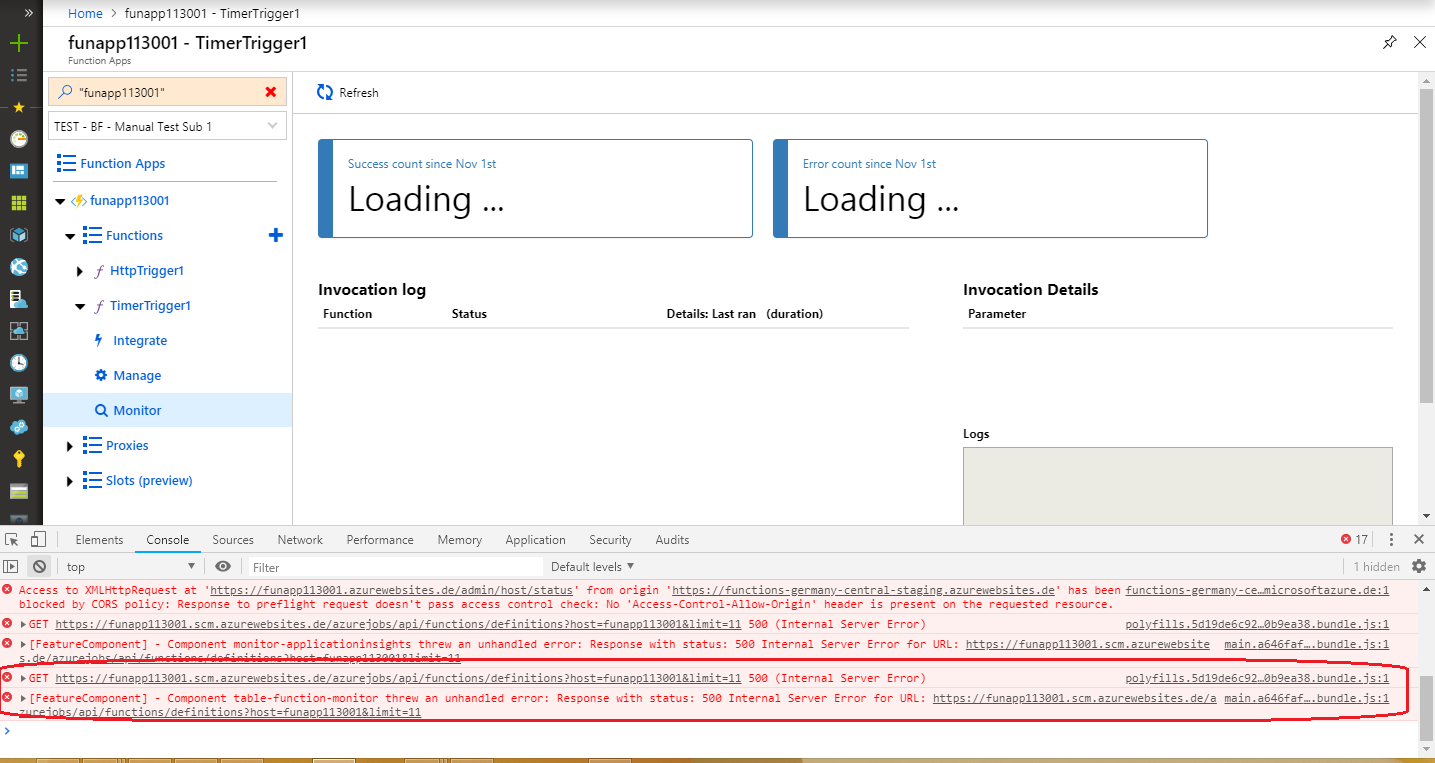
Repro steps:
1. Open a function app and add a function;
2. After verifying that a function has run successfully in the Develop tab , click the Monitor tab;
3. Verify the Monitor blade.
_Copied from original issue: Azure/azure-functions-ux#3482_
Contributor guide
Research direction
Start by reproducing the listed steps in the Azure portal: run a function successfully, then open the Monitor tab and inspect the unhandled error from monitor-applicationinsights. Use the provided snapshot, runtime versions, browser, and hosting plan as reproduction context. Done means the Monitor blade loads successfully after a function run.
Written by the indexing model from the issue text.
Assessment
- Tech stack
- azure, csharp
- Domain
- observability
- Issue type
- Bug
- Difficulty
- 4/5
- Estimated time
- 3-5 days
- Activity status
- Stale
- Clarity
- Needs clarification
- Newbie friendliness
- 25/100