Azure / Azure/azure-functions-core-tools
'"CORSCredentials": true' gives "Cannot access a disposed object. Object name: 'IServiceProvider'." when running an Azure Function locally
- Dominant language
- C#
- Stars
- 1.5k
- Forks
- 498
- Avg merge
- 5d 4h
- Merged PRs (30d)
- 15
Description
Attempting to run an Azure Function on localhost machine via `func host start --verbose` gives "Cannot access a disposed object. Object name: 'IServiceProvider'." when '"CORSCredentials": true' is specified in 'local.settings.json' file. However once it is changed to '"CORSCredentials": false' then the function starts up correctly.
Steps to reproduce
1. Create a default Azure Function via Visual Studio template
2. Add following code to 'local.settings.json' file:
```,
"Host": {
"LocalHttpPort": 7072,
"CORS": "*",
"CORSCredentials": true
}
```
3. Start the Azure Function on localhost either via Visual Studio 'run button' or via `func host start --verbose` command in command prompt of your choice (for instance Windows Terminal)
4. See "Cannot access a disposed object. Object name: 'IServiceProvider'." error being thrown as the Azure Function terminates abruptly.
See sample image depicting the issue:
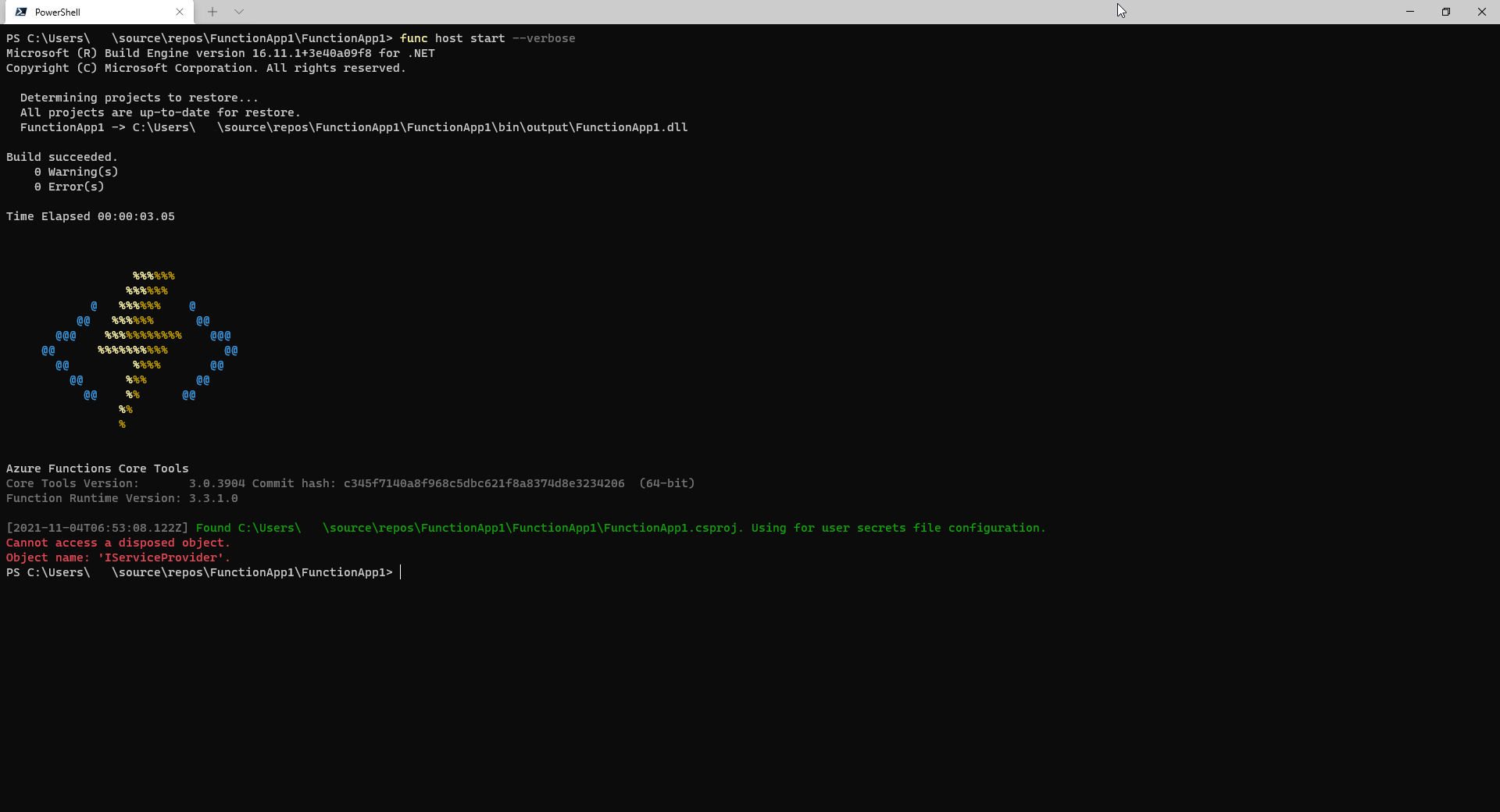
I am able to reproduce the above behavior at will. I have also attached a sample project which allows to reproduce the issue:
[FunctionApp1.zip](https://github.com/Azure/azure-functions-core-tools/files/7472915/FunctionApp1.zip)
Version information:
Azure Functions Core Tools:
Core Tools Version: 3.0.3904 Commit hash: c345f7140a8f968c5dbc621f8a8374d8e3234206 (64-bit)
Function Runtime Version: 3.3.1.0
Visual Studio:
Microsoft Visual Studio Professional 2019
Version 16.11.5
OS:
Edition Windows 10 Enterprise
Version 20H2
OS build 19042.1288
Experience Windows Feature Experience Pack 120.2212.3920.0
Contributor guide
Research direction
Reproduce the failure from local.settings.json by setting "CORSCredentials": true, then run `func host start --verbose` or start the default Visual Studio Azure Function. Compare startup with the setting false and use the reported disposed IServiceProvider error as the failure signal. Done means the local function starts successfully with credentials enabled.
Written by the indexing model from the issue text.
Assessment
- Tech stack
- csharp
- Domain
- cli
- Issue type
- Bug
- Difficulty
- 3/5
- Estimated time
- 1-2 days
- Activity status
- Stale
- Clarity
- Mostly clear
- Newbie friendliness
- 35/100