Azure / Azure/azure-functions-core-tools
Key combination on macOS interferes with func CLI
- Dominant language
- C#
- Stars
- 1.5k
- Forks
- 498
- Avg merge
- 5d 4h
- Merged PRs (30d)
- 15
Description
I was just scaffolding out a project with `func init` and then `func new`, and in both steps noticed that I'd somehow backspaced the prompt text the CLI output both in "Choose Option" and "Function name":
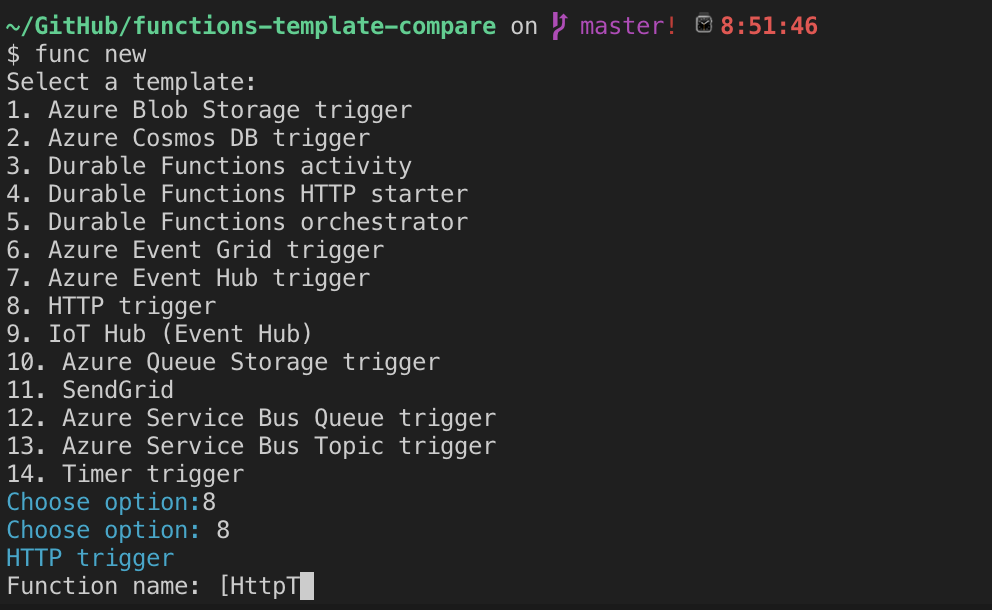
After a few more tries, I realized that there was an easy to reproduce way to achieve this:
- Type up to three characters
- Press `Option` and `Backspace`
- Nothing should happen
- Start pressing backspace
- You should be able to backspace the characters the CLI output
Contributor guide
Research direction
Reproduce the issue on macOS with `func init` and `func new`, following the Option-Backspace steps in the report. Start by tracing the CLI prompt handling for the “Choose Option” and “Function name” prompts; done means Option-Backspace leaves the prompt text unchanged while normal Backspace still removes typed characters.
Written by the indexing model from the issue text.
Assessment
- Tech stack
- csharp, macos
- Domain
- cli
- Issue type
- Bug
- Difficulty
- 3/5
- Estimated time
- 1-2 days
- Activity status
- Stale
- Clarity
- Clearly specified
- Newbie friendliness
- 45/100