No recursive folder create option: az storage directory create
- Dominant language
- Python
- Stars
- 4.6k
- Forks
- 3.5k
- Avg merge
- 3d 2h
- Merged PRs (30d)
- 60
Description
Was this case ever considered? So I wanted this folder `a/b/` inside my fileshare, but when I ran the command fails. Like in Linux, mkdir has a -p option to make the parent directory first instead of failing.
```
az storage directory create --account-name ACCOUNTNAME --share-name myfileshare --name a/b/
```
The `/` symbol is not even an allowed character in the folder name so I would think it's easy to parse the folder structure from the argument.
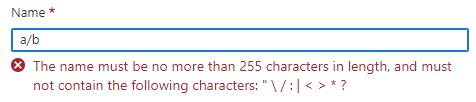
**Desired behavior:**
Create folder `a/`, then folder `a/b/` automatically. Meaning it will create the parent folder first instead of failing.
I have to do this manually.
```
az storage directory create --account-name ACCOUNTNAME --share-name myfileshare --name a/
az storage directory create --account-name ACCOUNTNAME --share-name myfileshare --name a/b/
```
---
#### Document Details
⚠ *Do not edit this section. It is required for docs.microsoft.com ➟ GitHub issue linking.*
* ID: c9536c0c-6728-0d34-9b51-0d5a417e0d80
* Version Independent ID: d80696c9-1748-c63d-b8bb-2089a4c97b43
* Content: [az storage directory](https://docs.microsoft.com/en-us/cli/azure/storage/directory?view=azure-cli-latest#feedback)
* Content Source: [latest/docs-ref-autogen/storage/directory.yml](https://github.com/MicrosoftDocs/azure-docs-cli/blob/main/latest/docs-ref-autogen/storage/directory.yml)
* Service: **storage**
* GitHub Login: @rloutlaw
* Microsoft Alias: **routlaw**
Contributor guide
Assessment
This issue has not been assessed yet.