az cosmosdb create --locations make not specified region but resource manager's resion.
- Dominant language
- Python
- Stars
- 4.6k
- Forks
- 3.5k
- Avg merge
- 3d 2h
- Merged PRs (30d)
- 60
Description
**Describe the bug**
When I create a CosmosDB account for a specified region using az cosmosdb create --locations command, "location" is not specified region, but resources group's region.
For example, if deploy the cosmosDB account location as "West US" region within a resource group's region "Japan East", "location" make "Japan East".
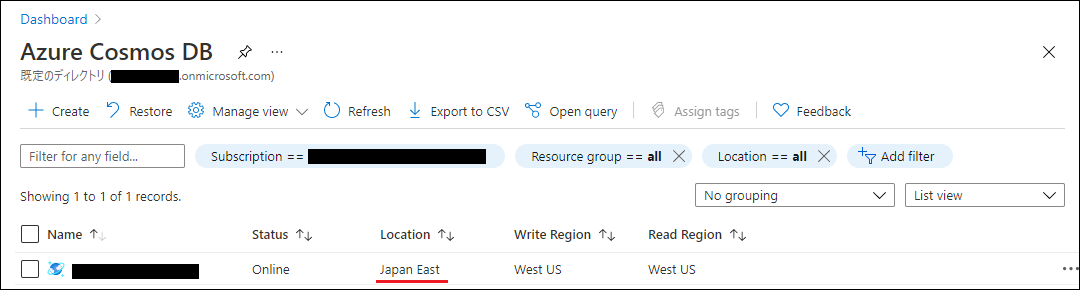
This symptom does not affect Cosmos DB account, but it does not occur when deployed in Azure portal or Azure PowerShell (New-AzCosmosDBAccount).
**To Reproduce**
Occurs when deploy the CosmosDB account by running the following command :
```
az cosmosdb create --name 'CosmosDBAccountName' \
--resource-group 'ResourceGroupName' \
--locations regionName='RegionName'
```
**Expected behavior**
I want it to be a "location" with a specified region, similar to the Azure portal and Azure PowerShell.
**Environment summary**
- Install Method
MSI
- CLI version
PS C:\> az --version
azure-cli 2.25.0
core 2.25.0
telemetry 1.0.6
- OS version
Windows 10 Pro (x64) version 21H1 (OS Build 19043.1052)
- Shell Type
Azure CloudShell, cmd.exe
Contributor guide
Assessment
This issue has not been assessed yet.