serious Private Endpoint creation inconsistencies & bugs
- Dominant language
- Python
- Stars
- 4.6k
- Forks
- 3.5k
- Avg merge
- 3d 2h
- Merged PRs (30d)
- 60
Description
### **This is autogenerated. Please review and update as needed.**
## Describe the bug
Today we wanted to rename some of our private endpoint connections by deleting & recreating them. We've discovered some serious inconsistencies in the Azure CLI for creating private endpoints. Which with by far the weirdest one is the appconfiguration one (this one seems to be a bug).
The `az network private-endpoint create` command has different behavior on how it works for every different type of resource behind it.
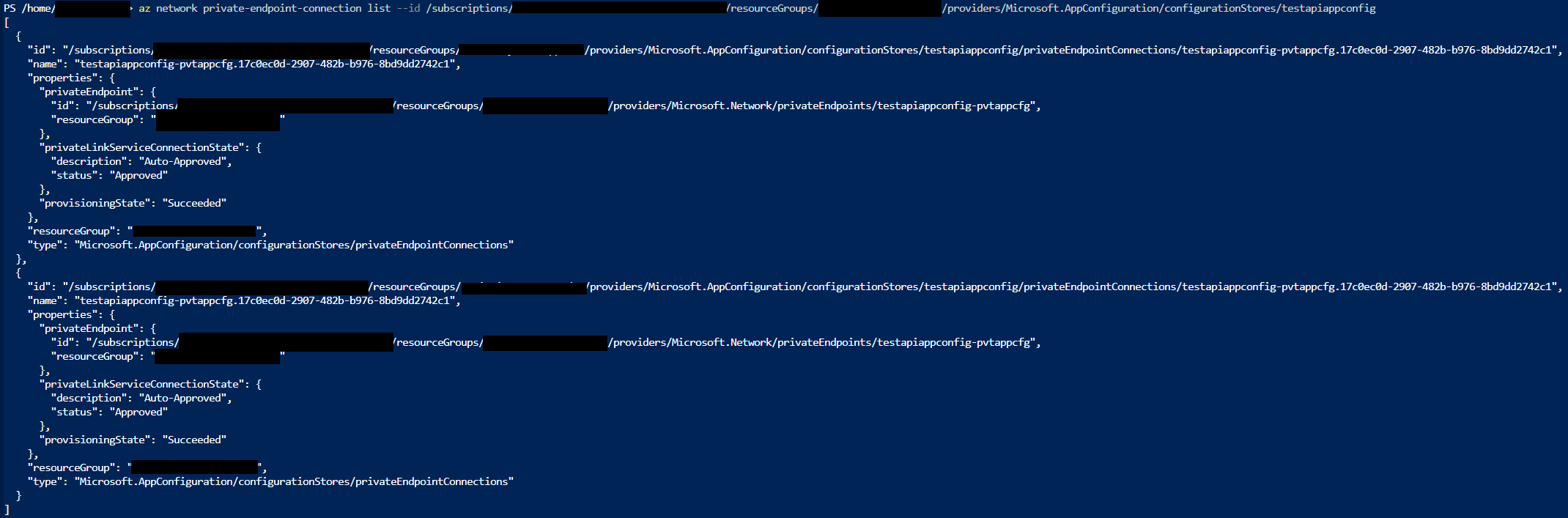
For the AppConfiguration; creation of multiple private endpoint connections with the same name is possible (bug). This means that the connections will be exact duplicates which will break the AppConfiguration altogether.
We took the liberty of testing this per resourcetype. Please find our findings in the reproduce section.
Screenshot where the appconfiguration has multiple connections with the same configuration:

Similar situation with AppConfig but outputted in JSON (this is a different run than the screenshot above). NOTE: these entries have exactly the same resource id's:
**Command Name**
`az network private-endpoint create`
**Errors:**
When creating a connection with a different connection name on the appservices for example we got this error:
```
(InvalidResponseFromPrivateLinkService) During Private Link operation, received invalid response from private link service Microsoft.AppConfiguration/configurationStores.
```
## To Reproduce:
Steps to reproduce the behavior. Note that argument values have been redacted, as they may contain sensitive information.
- Make sure to have the desired resource before adding a private endpoint to it.
- Use one of the following commands to create the private endpoints:
```
AppConfiguration
az network private-endpoint create --name testapiappconfig-pvtappcfg --resource-group MyResourceGroupName --subnet --private-connection-resource-id --group-id configurationStores --connection-name testapiappconfig-connection --debug
- Connection name is generated based on the PRIVATE ENDPOINT NAME (--name). It is appended with a GUID.
- The given connectionname is NOT taken over.
- If, after creating, you rerun this command with a different --connection-name, it WILL create another connection (which is an exact duplicate of the previous one), which is NOT desired. It will however give an error, which is desired, but the connection is created anyway.
- The resource id's from the different connections (which again; are exact duplicates) are exactly the same.
- After creating the second (and so on) connection with the new name, the appconfig becomes in a weird state where you can not remove the connections anymore. You have to delete and recreate the whole appconfiguration to fix this.
FunctionApp on Windows
az network private-endpoint create --name Testapp-fctapp-pvtfunc --resource-group MyResourceGroupName --subnet --connection-name Testapp-fctapp-connection --private-connection-resource-id --group-id sites --debug
- The given CONNECTIONNAME (--connection-name param) taken over, it is appended with a GUID.
- If, after creating, you rerun this command with a different --connection-name, it WILL NOT create another connection, which is desired. It will give an error, which is desired.
- This seems like desired behavior (except maybe from the GUID appendix).
FunctionApp on Linux
az network private-endpoint create --name Testapp-fctapp-pvtfunc --resource-group MyResourceGroupName --subnet --connection-name Testapp-fctapp-connection --private-connection-resource-id --group-id sites --debug
- The given CONNECTIONNAME (--connection-name param) taken over, it is appended with a GUID.
- If, after creating, you rerun this command with a different --connection-name, it WILL NOT create another connection, which is desired. It will give an error, which is desired.
- This seems like desired behavior (except maybe from the GUID appendix).
Keyvault
az network private-endpoint create --name testapikvn68-pvtkv --resource-group MyResourceGroupName --subnet --private-connection-resource-id --group-id vault --connection-name testapikvn68-connection --debug
- The given CONNECTIONNAME (--connection-name param) taken over, it is NOT appended with a GUID. This is desired behavior.
- If, after creating, you rerun this command with a different --connection-name, it WILL NOT create another connection, which is desired. It however WILL NOT give an error, which is NOT desired.
SQL Server
az network private-endpoint create --name testapidevsql-pvtsql --resource-group MyResourceGroupName --subnet --private-connection-resource-id --group-id sqlServer --connection-name testapidevsql-connection --debug
- Connection name is generated based on the PRIVATE ENDPOINT NAME (--name). It is appended with a GUID.
- The given connectionname is NOT taken over.
- If, after creating, you rerun this command with a different --connection-name, it WILL NOT create another connection, which is desired. It however WILL NOT give an error, which is NOT desired.
Storage Account
az network private-endpoint create --name curtestappdevstrg-pvtstg-blob --resource-group MyResourceGroupName --subnet --private-connection-resource-id --group-id blob --connection-name curtestappdevstrg-connection --debug
- Connection name is generated based on the RESOURCE NAME. It is appended with a GUID.
- The given connectionname is NOT taken over.
- If, after creating, you rerun this command with a different --connection-name, it WILL NOT create another connection, which is desired. It however WILL NOT give an error, which is NOT desired.
Web App on Windows
az network private-endpoint create --name Testapp-app-pvtapp --resource-group MyResourceGroupName --subnet --connection-name Testapp-app-connection --private-connection-resource-id --group-id sites --debug
- The given CONNECTIONNAME (--connection-name param) taken over, it is appended with a GUID.
- If, after creating, you rerun this command with a different --connection-name, it WILL NOT create another connection, which is desired. It will give an error, which is desired.
Web App on Linux
az network private-endpoint create --name Testapp-app-pvtapp --resource-group MyResourceGroupName --subnet --connection-name Testapp-app-connection --private-connection-resource-id --group-id sites --debug
- The given CONNECTIONNAME (--connection-name param) taken over, it is appended with a GUID.
- If, after creating, you rerun this command with a different --connection-name, it WILL NOT create another connection, which is desired. It will give an error, which is desired.
ACR
az network private-endpoint create --name Testappdev-pvtacr-registry --resource-group MyResourceGroupName --subnet --private-connection-resource-id --group-id registry --connection-name Testappdev-connection --debug
- Connection name is generated based on the RESOURCE NAME. It is appended with a GUID.
- The given connectionname is NOT taken over.
- If, after creating, you rerun this command with a different --connection-name, it WILL NOT create another connection, which is desired. It however WILL NOT give an error, which is NOT desired.
```
## Expected Behavior
My expectation is that the connection name is exactly as defined in the `--connection-name` parameter in the `az network private-endpoint create` CLI call. Also when you try to add the same connection (same vnet/subnet & private endpoint) with a new name I expect an error telling me there is already an entry. Whenever you use the same `--connection-name` it should just do nothing (since it is already at the desired state).
## Environment Summary
```
Linux-4.15.0-1103-azure-x86_64-with-debian-10.2 (Cloud Shell)
Python 3.6.10
Installer: DEB
azure-cli 2.17.1 *
azure-cli-ml 1.19.0
Extensions:
ai-examples 0.2.5
azure-cli-ml 1.19.0
```
Contributor guide
Assessment
This issue has not been assessed yet.