az monitor autoscale rule create ISSUES and lacking documentation
- Dominant language
- Python
- Stars
- 4.6k
- Forks
- 3.5k
- Avg merge
- 3d 2h
- Merged PRs (30d)
- 60
Description
### Overview:
Posting this more as a potentially useful reference for anyone else attempting to create autoscale rules for anything other than the VM CPU Percentage metric you see almost exclusively.
Challenge: create 2 simple autoscale rules for an app service plan to scale up and down depending on queue depth.
This can be done in the portal obviously but needs to be in a deployment script as per usual.
Problem(s) for the AZ CLI team to resolve which I encountered on **The Journey**:
1. You can't monitor a topic subscription so you need to redirect to a service bus queue.
2. The documentation on the whole az cli monitor feature is abysmal. After scraping the internet for hours I had to revert to digging in the python source code to try and make sense of the cryptic and ambiguous parameters and error codes. Pretty much the ONLY information you find is how to scale a VM based on it's own CPU metric. For anything else even slightly advanced, like targeting a different resource with other Metrics and Dimensions - well, good luck.
3. Unable to query for relative Metrics using 'az monitor metrics list-definitions' when targeting service bus queues.
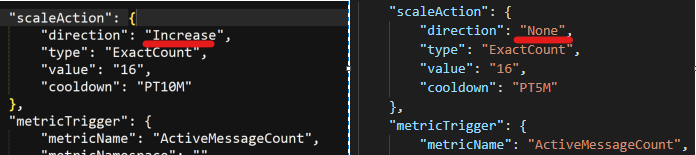
4. Creating a "scale to" in the portal correctly populates the 'direction' field with increase or decrease, while using the az cli command line does not (EDIT: this is actually a critical error and will cause the rule to **_NOT_** work!):
### The Solution:
You're unfortunately using this brief description to create a very complex structure:
```
-condition [Required] : The condition which triggers the scaling action.
Usage: --condition ["NAMESPACE"] METRIC {==,!=,>,>=,<,<=} THRESHOLD
{avg,min,max,total,count} PERIOD
[where DIMENSION {==,!=} VALUE [or VALUE ...]
[and DIMENSION {==,!=} VALUE [or VALUE ...] ...]]
Dimensions can be queried by adding the 'where' keyword and multiple dimensions can be
queried by combining them with the 'and' keyword. Values for METRIC and appropriate
THRESHOLD values can be obtained from the `az monitor metric` command. Format of PERIOD is
"##h##m##s".
```
Basically one of the first steps is you need to find the right special metric string value for the rule to target.
Allegedly you can use 'az monitor metrics list-definitions' to get a list of viable metrics to use: i.e.
`az monitor metrics list-definitions --resource /subscriptions/MySub/resourceGroups/MyResourceGroup/providers/Microsoft.ServiceBus/namespaces/my-sb1/queues/myqueue`
However you'll be greeted with an error telling you the following:
_**"Microsoft.ServiceBus/namespaces/queues is not a supported platform metric namespace, supported ones are..."**_
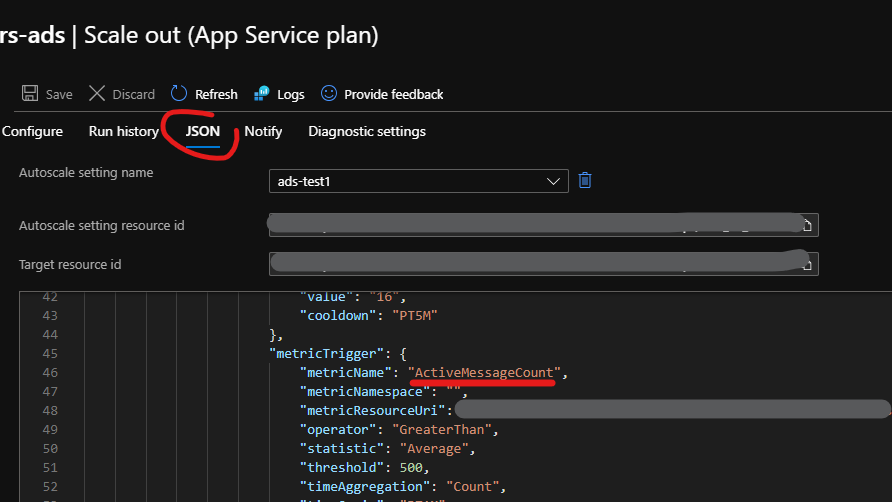
Essentially in my case only the service bus namespace itself was supported - not any child queues. I found a value called ActiveMessages but this value doesn't work for queues. I needed to create the desired rule in the portal and then take the Metric value from the JSON as seen in the image below and take the value 'ActiveMessageCount':
You can also peruse the correct THRESHOLD (I used 'Count') and DIMENSION magic string values from either of the above two methods if needed.
You then need to create an autoscale entry profile which is a parent to the rules you intend to create (NOTE: this will create an autoscale profile named 'default' by default.) i.e.:
```
$appServicePlanId = az appservice plan show -n MyWebServer -g MyResourceGroup --query "id" -o tsv
az monitor autoscale create -n MyAutoScale --resource $appServicePlanId --count 1 --min-count 1 --max-count 16
```
After that you can create the various rules, for example:
```
$queueId = az servicebus queue show --namespace-name MySBNamespace -n MyQueueName -g MyResourceGroup --query "id" -o tsv
az monitor autoscale rule create -g MyResourceGroup --autoscale-name MyAutoscale --scale to 16 --resource $queueId --condition "ActiveMessageCount > 500 count 1m"
```
Hope this helps someone.
### EDIT, working around the other breaking bugs:
Due to the az monitor autoscale rule create command, template and available params not allowing you to change the important 'dividePerInstance' field - as well as the scale 'direction' field bug https://github.com/Azure/azure-cli/issues/16029#issue-749876424, I needed to add these further update commands afterwards to allow the autoscale rules to actually work.
**_NOTE: the ordering of the 'dividePerInstance' commands at the end is important because of another 'feature' which sets the dividePerInstance back to true every time you actually change the rule using any other command._**
```
az monitor autoscale rule delete --autoscale-name MyAutoscale -g MyResourceGroup --index *
az monitor autoscale rule create -g MyResourceGroup --autoscale-name MyAutoscale --scale to 16 --resource $bufferQueueId
--condition "ActiveMessageCount > 500 count 1m"
az monitor autoscale update -n MyAutoscale -g MyResourceGroup --set profiles[name=default].rules[0].scaleAction.direction=Increase
az monitor autoscale rule create -g MyResourceGroup --autoscale-name MyAutoscale --scale to 1 --resource $bufferQueueId
--condition "ActiveMessageCount <= 500 count 1m"
az monitor autoscale update -n MyAutoscale -g MyResourceGroup --set profiles[name=default].rules[1].scaleAction.direction=Decrease
az monitor autoscale update -n MyAutoscale -g MyResourceGroup --set profiles[name=default].rules[0].metricTrigger.dividePerInstance=false
az monitor autoscale update -n MyAutoscale -g MyResourceGroup --set profiles[name=default].rules[1].metricTrigger.dividePerInstance=false
```
Contributor guide
Assessment
This issue has not been assessed yet.