[Packaging] Install Azure CLI under the user folder
- Dominant language
- Python
- Stars
- 4.6k
- Forks
- 3.5k
- Avg merge
- 3d 2h
- Merged PRs (30d)
- 60
Description
When installing Azure CLI [on Windows](https://docs.microsoft.com/en-us/cli/azure/install-azure-cli-windows?view=azure-cli-latest&tabs=azure-cli) or [Linux](https://docs.microsoft.com/en-us/cli/azure/install-azure-cli-apt?view=azure-cli-latest), **admin** (**superuser**) permission is necessary.
Users who don't have admin (superuser) permission can't install Azure CLI in the recommended ways - MSI and `apt`. `pip install` is the only way to workaround it.
Even after Azure CLI is installed by the system admin, the user may need to edit files like `C:\Program Files (x86)\Microsoft SDKs\Azure\CLI2\Lib\site-packages\certifi\cacert.pem` under the Azure CLI installation folder to make it [work behind a proxy](https://docs.microsoft.com/en-us/cli/azure/use-cli-effectively?view=azure-cli-latest#work-behind-a-proxy).
**Describe the solution you'd like**
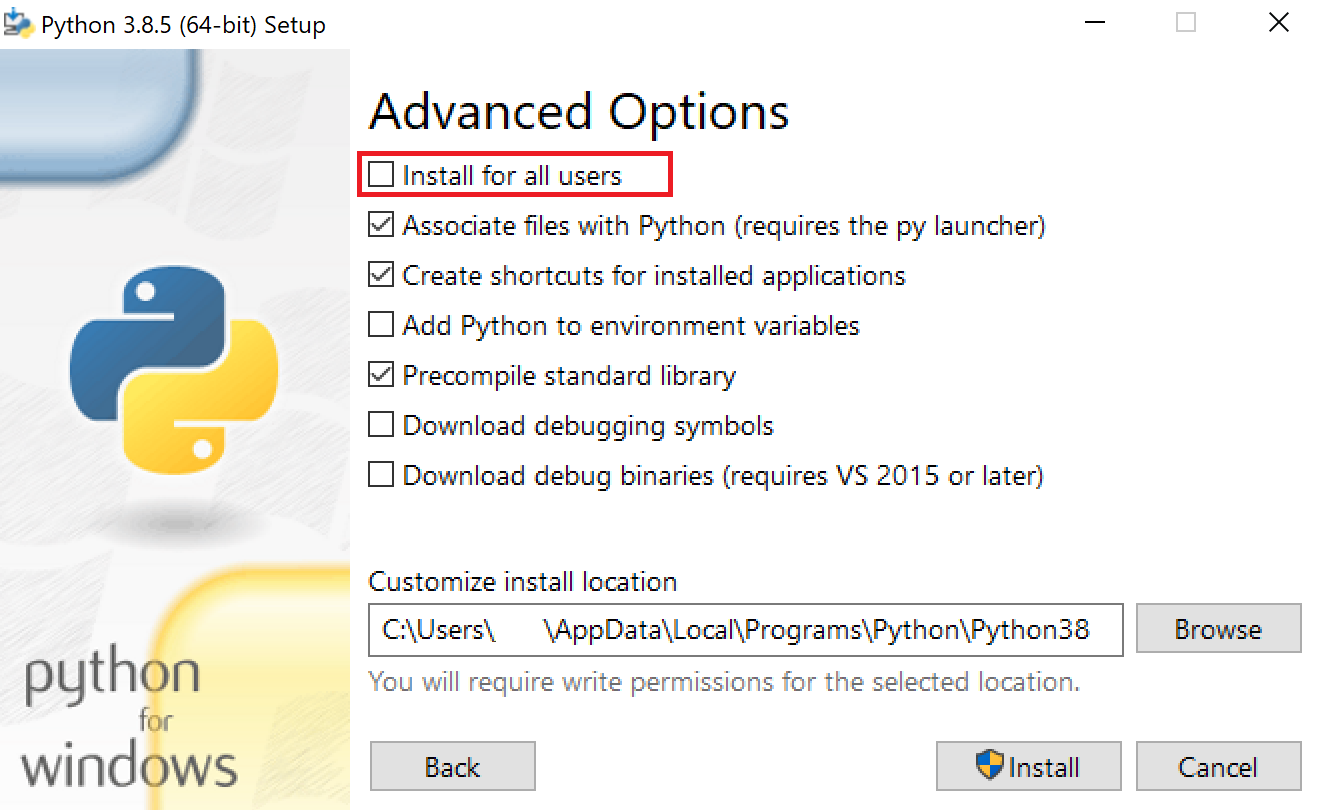
It should be possible for the user to select to install Azure CLI under the **user folder**:
- On Windows: `C:\Users\`
- On Linux: `/home/`
Python has such functionality:
Contributor guide
Assessment
This issue has not been assessed yet.