Azure / Azure/azure-cli-extensions
`Invalid bool parameter PrepareEnvironment` in submitting `az ml pipeline submit-draft` command
- Dominant language
- Python
- Stars
- 454
- Forks
- 1.7k
- Avg merge
- 2d 19h
- Merged PRs (30d)
- 64
Description
### Extension name (the extension in question)
ml
### Description of issue (in as much detail as possible)
We're thinking about constructing MLOps scheme with Azure ML Designer. In re-training the existing pipeline
```
az ml pipeline submit-draft ^
--workspace-name (workspace name) ^
--resource-group (resource group name) ^
--pipeline-draft-id (pipeline id)
```
The command itself returned the normal return as follows:
```
Submitted PipelineRun xxxx-xxxx-xxxx-xxxx from PipelineDraft xxxx-xxxx-xxxx-xxxx.
{
"Experiment": "kyiwasak-2020-12-14",
"Id": "xxxx-xxxx-xxxx-xxxx",
"Status": "Running",
"Type": "azureml.PipelineRun"
}
```
But, we encounter the following error like `Invalid bool parameter PrepareEnvironment`, in opening actual designer UI:
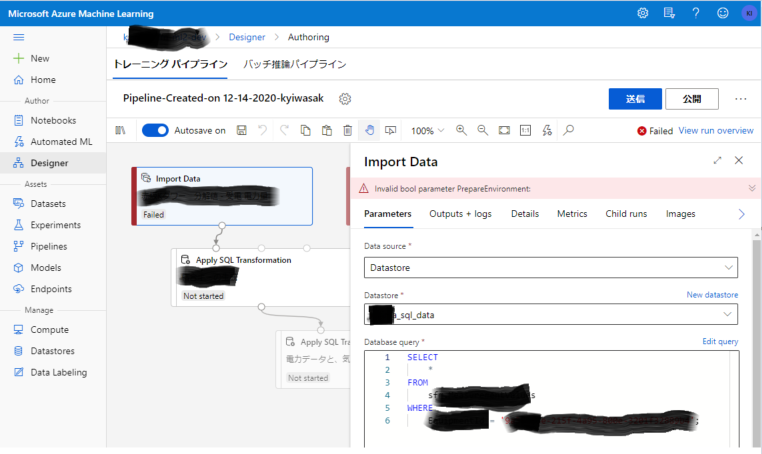
As long as I checked the references, we don't have any additional parameter with [cli command](https://docs.microsoft.com/en-us/cli/azure/ext/azure-cli-ml/ml/pipeline?view=azure-cli-latest#ext_azure_cli_ml_az_ml_pipeline_submit_draft). Can we have any work-around or fix the issue?
-----
Contributor guide
Research direction
Start by reproducing the `az ml pipeline submit-draft` command in the `ml` extension and inspect the `pipeline submit-draft` entry point, using the linked command reference. Done means the submission succeeds and the resulting pipeline opens in Azure ML Designer without the `Invalid bool parameter PrepareEnvironment` error.
Written by the indexing model from the issue text.
Assessment
- Tech stack
- azure, python
- Domain
- cli, cloud
- Issue type
- Bug
- Difficulty
- 4/5
- Estimated time
- 3-5 days
- Activity status
- Stale
- Clarity
- Mostly clear
- Newbie friendliness
- 25/100