Azure / Azure/api-management-developer-portal
Text format panel - "clear applied styles" function/icon is missing (improved UX for content designer)
- Dominant language
- TypeScript
- Stars
- 545
- Forks
- 360
- PR merge metrics
- No merged PRs in 30d
Description
## Bug description
To remove several font styles that have been applied to a text, you need to select the text and remove each format one after the other. If you have to take care for a lot of content, this is not feasible. It slows you down. There are still so many such issues that slow you down as a content designer/ technical writer). Let´s get rid of them to gain more speed in designing high-professional contents.
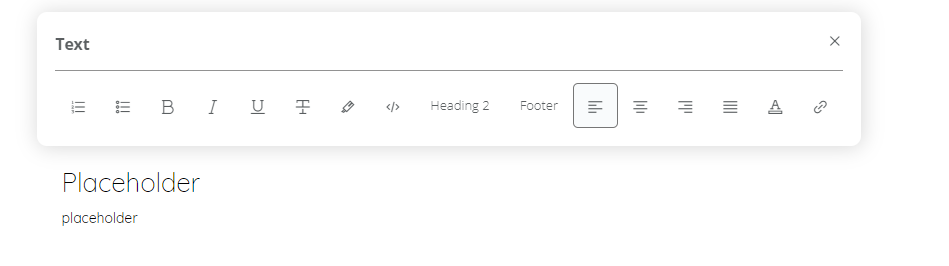
1) For example, if you have selected a text and have applied three kinds of styles, you need to select each of them separately. Especially, if you have applied a font color, you need to first click on the color icon and then select default or no font color.
2) If you have copied and pasted a text section for somewhere else and you like to get rid of all applied formats, you need to first paste the copied text to the notepad or you need to select paste with no styles. But if you forgot this, there is no function in the editor/designer mode to do this right within the portal.
3) Sometimes it is hard to remove the list format after applying it (buggy).
**Additional questions/remarks:**
Is it intended that text styles are not always consistently applied for all screen resolutions? How can I ensure that my applied styles are available for all screen resolutions?
For example, the standard text uses a block layout, but in some cases with only a few texts, I need to consistently apply left alignment of the texts. But I observed that the left alignment was often not applied consistently across all screen resolutions. I do not have the time to repeat such steps again and again for all affected text widgets and for all screen resolutions. What are your assumptions here how I can ensure to consistently apply the right text alignment across all screen resolutions?
## Expected behavior
1) An icon on format panel is required that removes all formats from the selected text.
2) All texts would be displayed as standard text. Only the styles as applied to the standard text should be applied to
the selected text.
3) Also for text formatted as a list or sequence, it would be of a great help if clear all formats could be used to remove all list or number formats.
4) All applied styles should be removed from the text for all window resolutions consistently. Or I need the option to chose whether I like to clear the applied fonts for only the current or for all screen resolutions.
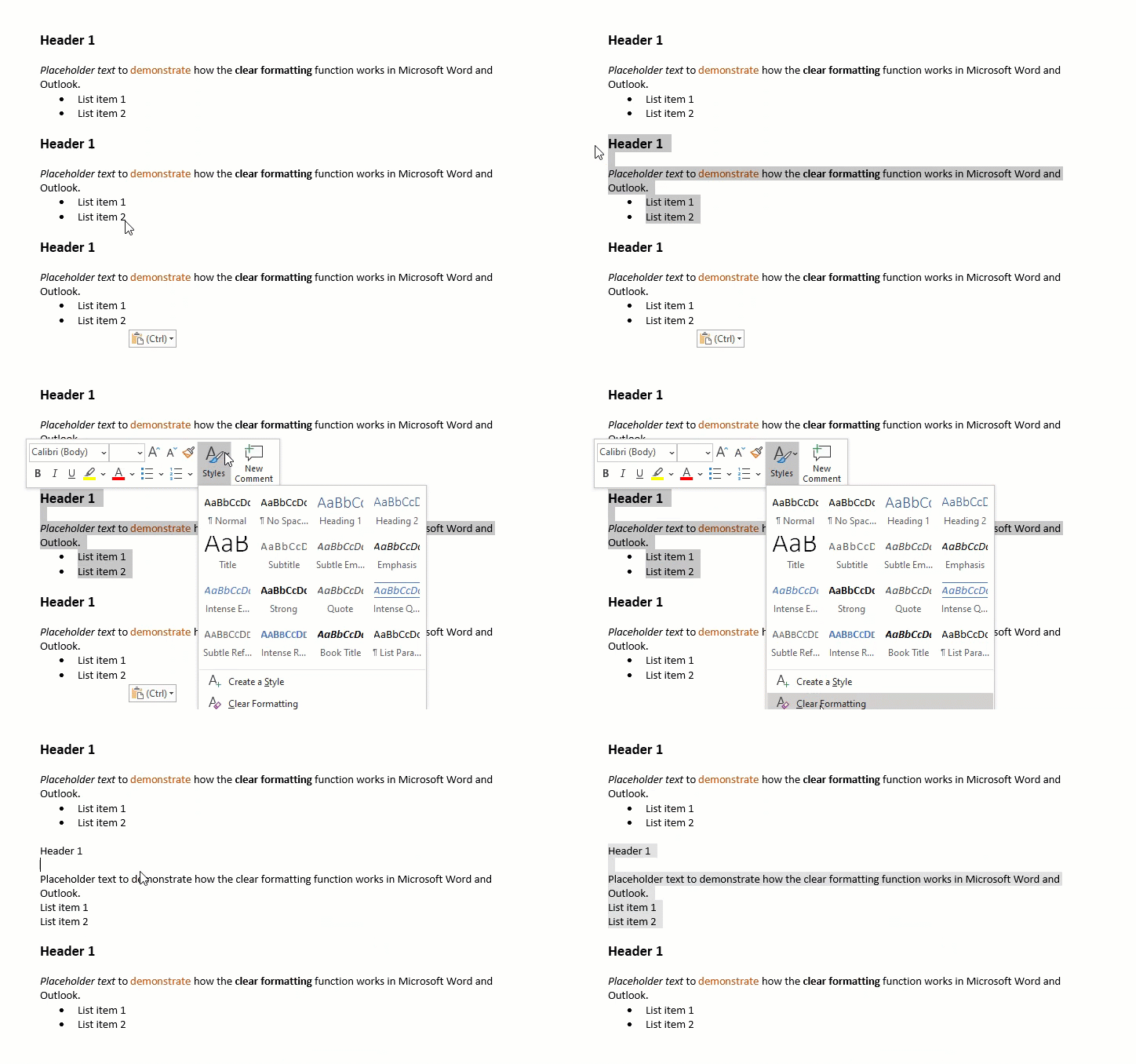
Example how clearing applied styles/formats works in Microsoft Outlook and Word:
Contributor guide
No contributing guide indexed for this repository
Research direction
No file or test is named in the issue; begin by locating the text format panel in the TypeScript frontend and reproducing formatting and list behavior on selected text. Done means the panel can clear all applied styles, including list or number formats, with the requested consistency across window resolutions.
Written by the indexing model from the issue text.
Assessment
- Tech stack
- typescript
- Domain
- design, frontend
- Issue type
- Bug
- Difficulty
- 4/5
- Estimated time
- 3-5 days
- Activity status
- Stale
- Clarity
- Needs clarification
- Newbie friendliness
- 28/100