Azure / Azure/Azure-DataFactory
Complex Array Typing Lost on Rule Base Mapping Select
- Dominant language
- PowerShell
- Stars
- 529
- Forks
- 623
- PR merge metrics
- No merged PRs in 30d
Description
Hi,
I have run into an issue where if I use a rule based mapping in a select to elevate properties up a scope, the typing information for a complex or complex array are lost:
While in this example there are only 3 properties, my actual workflow I have over 600 properties which is why I was trying to use the rule-based mapping.
I am specifically dealing with:
- the Data Factory UI
- a flowlet
- a json file
- a select schema modifier
- a rule based mapping to elevate sub properties to a global scope
example json:
```json
{
"thing": {
"id": 1234,
"complexArray": [
{"id": 223, "name": "test 1"},
{"id": 222, "name": "test 2"}
],
"complex": {
"id": 232,
"name": "test 3",
"type": "Complex"
}
}
}
```
selecting this json file as a source brings in the types correctly no problem:

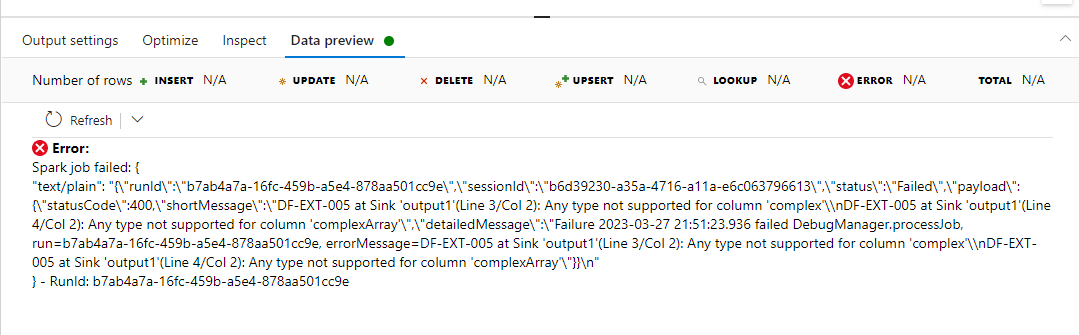
if I then run a select because I want to unwrap the "thing" property and elevate its properties to the main scope, I lose the typing information which causes an error.
Select rule based mapping:

which leads to `any` instead of the `complex` type:
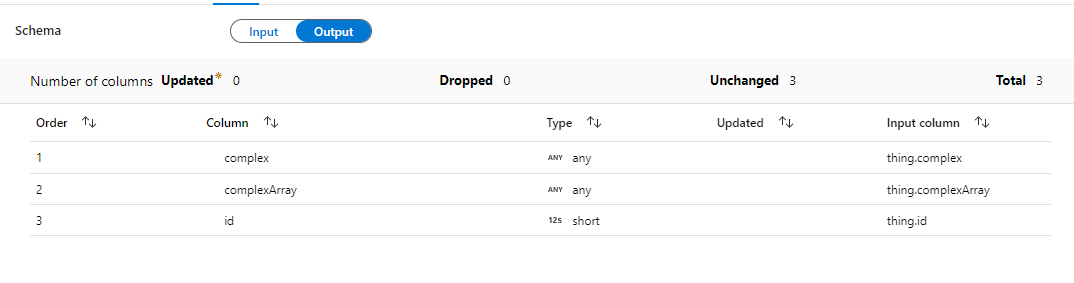
and then causes me an error when I try to have this as an output in a flowlet:
Contributor guide
Assessment
This issue has not been assessed yet.