Automattic / Automattic/wp-calypso
FSE: Hide FSE Blocks from Email to Followers
- Dominant language
- TypeScript
- Stars
- 12.6k
- Forks
- 2k
- Avg merge
- 1d 17h
- Merged PRs (30d)
- 538
Description
### What
Add an option to hide FSE blocks from the emails sent to followers.
### Why
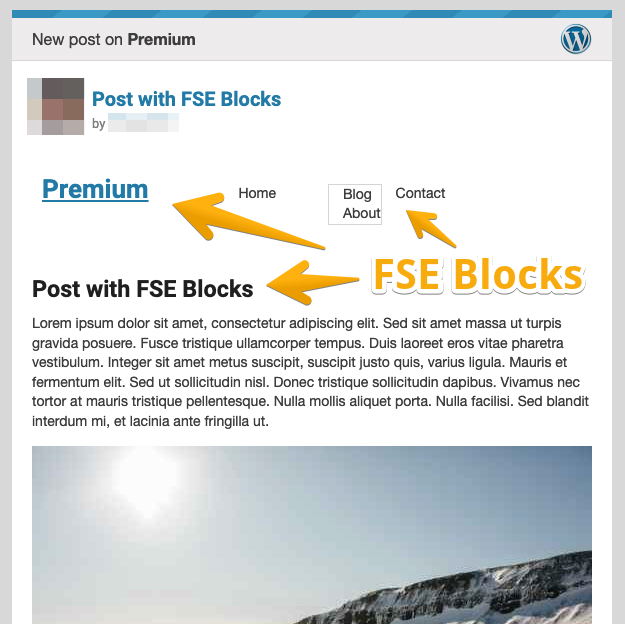
When creating a new post, if you're using the Blank Canvas theme for example, you will probably use FSE blocks such as Site Title, Post Title, Navigation, etc., once the post is published, site followers will get all those blocks on the email too, which is confusing, because it's actually part of the site itself, not the post.
### How
All the content is duplicated, what's already on the email area, it's also shown on the post area, because of the FSE blocks:
Contributor guide
Research direction
No files, tests, or entry points are named. Start by locating the follower-email generation path and how FSE blocks enter the post content, then define how the hide option is exposed and applied. Done means follower emails omit FSE blocks while retaining the actual post content.
Written by the indexing model from the issue text.
Assessment
- Tech stack
- typescript
- Domain
- content
- Issue type
- Feature
- Difficulty
- 4/5
- Estimated time
- 3-5 days
- Activity status
- Stale
- Clarity
- Mostly clear
- Newbie friendliness
- 35/100