Automattic / Automattic/wp-calypso
"Always Start with the Classic Block" Option | Remove "Convert to Blocks" on Classic Block
- Dominant language
- TypeScript
- Stars
- 12.6k
- Forks
- 2k
- Avg merge
- 1d 17h
- Merged PRs (30d)
- 552
Description
### What
Classic block as a default option | Removing "Convert to Block"
### Why
>Is there any way to stop the “Convert to blocks” tab from appearing when I use Classic Block? Besides being intrusive (which affects my creative process), it doesn’t make any sense: first, because the Classic Block is a block; second, because if I’m using it it’s because I don’t want to use another one (and I use others when I think it’s necessary).
https://wordpress.com/forums/topic/stop-the-convert-to-blocks-tab/#post-3741547
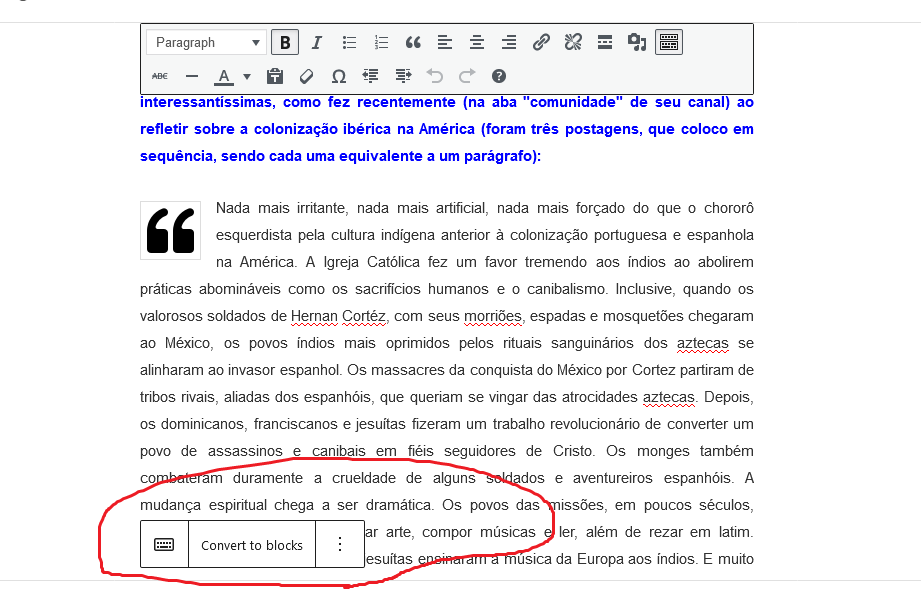
### How
Our moderator proposed a feature request in light of the above issue:
> While I personally like using the block editor, I know it can be a challenge for some. Maybe there could be a setting in the Editor Preferences that one could tick to “Always Start with a Classic Block”? That way, people who feel more comfortable working in the Classic environment would already be set up to start writing from the get go when opening the Editor.
From: https://wordpress.com/forums/topic/stop-the-convert-to-blocks-tab/#post-3741581
Contributor guide
Research direction
Start by reviewing the linked WordPress.com forum discussion to understand whether the requested outcome is an Editor Preferences setting, removal of the conversion tab, or both. Identify the editor entry points and tests responsible for Classic Block startup and the conversion prompt; done means the selected preference is honored and the unwanted prompt no longer appears.
Written by the indexing model from the issue text.
Assessment
- Tech stack
- react, typescript
- Domain
- frontend
- Issue type
- Feature
- Difficulty
- 5/5
- Estimated time
- Over a week
- Activity status
- Stale
- Clarity
- Mostly clear
- Newbie friendliness
- 25/100