Automattic / Automattic/wp-calypso
Nav Sidebar 'add new page' + Start Page Templates - SPT back button to lead back to previous editor screen.
- Dominant language
- TypeScript
- Stars
- 12.6k
- Forks
- 2k
- Avg merge
- 1d 17h
- Merged PRs (30d)
- 552
Description
As noted by @joanrho in #48370 - when a new page is created from inside the editor through the nav sidebar flow, the back button in the Starter Page Template modal should lead back to the last editor instance where the creation was triggered from. Currently, this button is set to close the editor and lead back to the appropriate calypso entry point (as managed by the calypsoifyGutenberg.closeUrl global).
To Reproduce:
* Open the editor from calypso. Open the nav sidebar, and select "add new page" from the bottom:
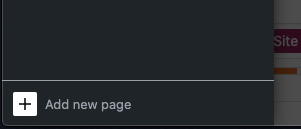
* The new page should load with the SPT modal open. Clicking the back button in the SPT modal takes the user back to calypso, as opposed to the previous editor screen.
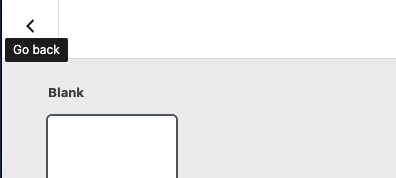
In the case that new page creation is triggered from within the editor, this back button needs to lead back to that previous editor screen as opposed to a calypso or wp-admin management screen.
Contributor guide
Research direction
Start with the nav sidebar's “add new page” flow and the Starter Page Template modal, then trace how the calypsoifyGutenberg.closeUrl global is set and used. Reproduce the flow from an existing editor screen; done means the modal's back button returns to that editor instead of Calypso or wp-admin.
Written by the indexing model from the issue text.
Assessment
- Tech stack
- react, typescript
- Domain
- frontend, web-dev
- Issue type
- Bug
- Difficulty
- 4/5
- Estimated time
- 3-5 days
- Activity status
- Stale
- Clarity
- Mostly clear
- Newbie friendliness
- 35/100