Automattic / Automattic/syntaxhighlighter
Upgrading to WordPress 5 breaks shortcodes
- Dominant language
- CSS
- Stars
- 251
- Forks
- 81
- PR merge metrics
- No merged PRs in 30d
Description
Using Wordpress 4.9.10 and SyntaxHighlighter Evolved 3.5.4, I created a page, and put the following content into the Text editor:
```
[php]
[/php]
[xml]
[/xml]
```
When published, it displays with the correct highlighting and indentation:
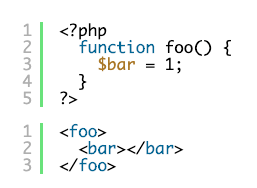
(I know I'm correct to not HTML-encode this content in the editor, because if I do, it displays incorrectly when published.)
Then I upgraded to WordPress 5.4.2. After the upgrade, the page initially displays correctly.
However, when I try to edit it, it adds an extra layer of HTML-encoding to the content. When I go to Edit Page, it opens as a Classic block, and looks like this:
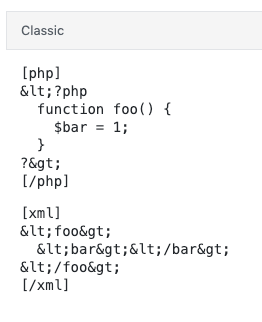
And when published, it looks like this:
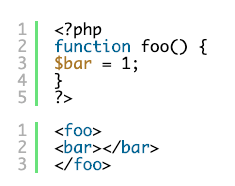
What's worse, every time I **CLICK** inside the block editor and then click outside it, it adds another layer of HTML encoding:
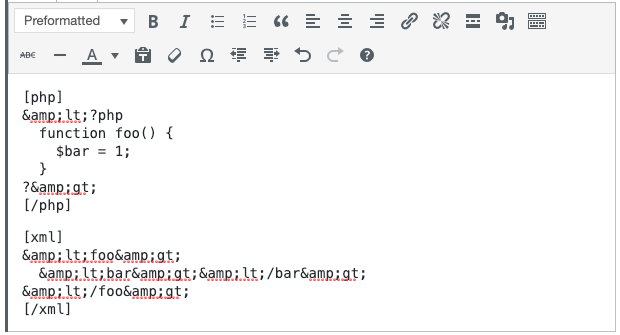
And when published, it looks like this:
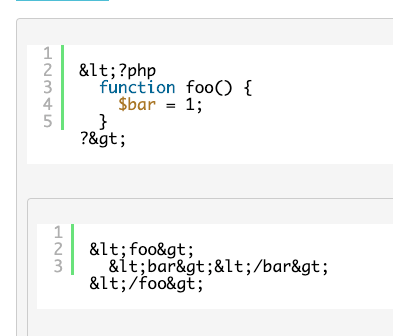
Is there any way to salvage this content when upgrading?
Contributor guide
No contributing guide indexed for this repository
Assessment
This issue has not been assessed yet.