Automattic / Automattic/simplenote-macos
[Big Sur] Tags renaming area borders conflict with tag backlight.
Open
[feature] tags
bug
- Dominant language
- Swift
- Stars
- 1.6k
- Forks
- 172
- Avg merge
- 11h 17m
- Merged PRs (30d)
- 3
Description
It was mentioned that it's not reproducible on Catalina.
### Expected
When the tag is renamed, the edit field borders should look neat
### Observed
There's a bit of overlap with tag backlight. Better visible with Light Theme:
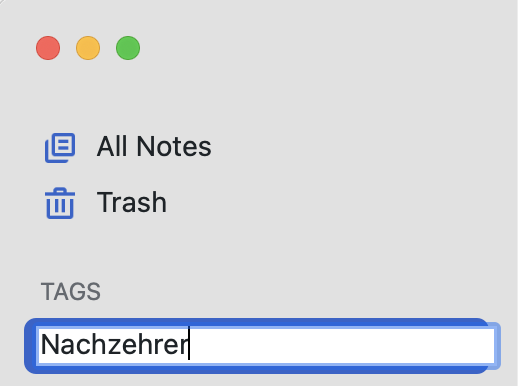
### Reproduced
1. Have any tag
2. Start renaming it
Make|Model|macOS Version|App Version
-|-|-|-
Mac|MBP 16|Big Sur 11.2|2.9 (11223)
Contributor guide
Research direction
Start by reproducing tag renaming on macOS Big Sur, using the issue’s steps and Light Theme screenshot as the visual reference. Trace the tag editing UI until you find the border and backlight presentation; done means the edit field borders no longer overlap the tag backlight.
Written by the indexing model from the issue text.
Assessment
- Tech stack
- swift
- Domain
- design, desktop
- Issue type
- Bug
- Difficulty
- 3/5
- Estimated time
- 1-2 days
- Activity status
- Stale
- Clarity
- Mostly clear
- Newbie friendliness
- 35/100