Automattic / Automattic/simplenote-macos
Add 'Copy' button or action next to/inside the published link
Open
[feature] publish
enhancement
- Dominant language
- Swift
- Stars
- 1.6k
- Forks
- 172
- Avg merge
- 11h 17m
- Merged PRs (30d)
- 3
Description
### What
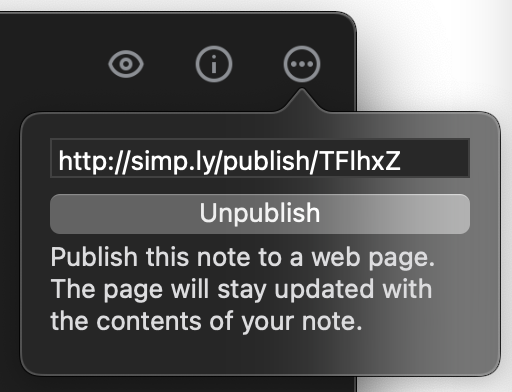
Once a note is published and the URL is generated, it would be nice to have a faster way of copying the URL than selecting text and Cmd+C.
### Why
Do things faster. In different forms present in iOS, Electron and Android.
### How
Either a separate button, or a click inside the field with URL to copy to the clipboard.
Contributor guide
Research direction
Start at the macOS UI shown after a note is published, where the generated URL is displayed. Determine the existing published-link entry point and how clipboard actions are handled in the app. Done means users can copy the generated URL through a visible button or an action on the URL field.
Written by the indexing model from the issue text.
Assessment
- Tech stack
- swift
- Domain
- desktop
- Issue type
- Feature
- Difficulty
- 3/5
- Estimated time
- 1-2 days
- Activity status
- Stale
- Clarity
- Mostly clear
- Newbie friendliness
- 48/100