Automattic / Automattic/simplenote-macos
Tag list should display a scroll bar for accessibility
- Dominant language
- Swift
- Stars
- 1.6k
- Forks
- 172
- Avg merge
- 11h 17m
- Merged PRs (30d)
- 3
Description
The tag list is scrollable but never displays a scrollbar of any kind. For me this is an accessibility problem because I have great difficulty using a scroll wheel or scroll gesture. I often rely on clicking and dragging a scrollbar to scroll things. I'm using macOS 11.1 and I have the option "Show scroll bars" set to "Always" in _System Preferences_ > _General_.
I get that there's not a lot of room there, which I am assuming is part of the reasoning for not having a scroll bar there. Perhaps it could be displayed on hover to make it less obtrusive (even though it contradicts the system preference above).
### Expected
I expected the tag list to display a scrollbar.
### Observed
It's possible to scroll the tag list with a scroll wheel but not with a mouse button.
### Reproduced
You need enough tags in the tag list so that they overflow and require scrolling. I suppose you could also set your System Preferences as I mentioned above and then open the app.
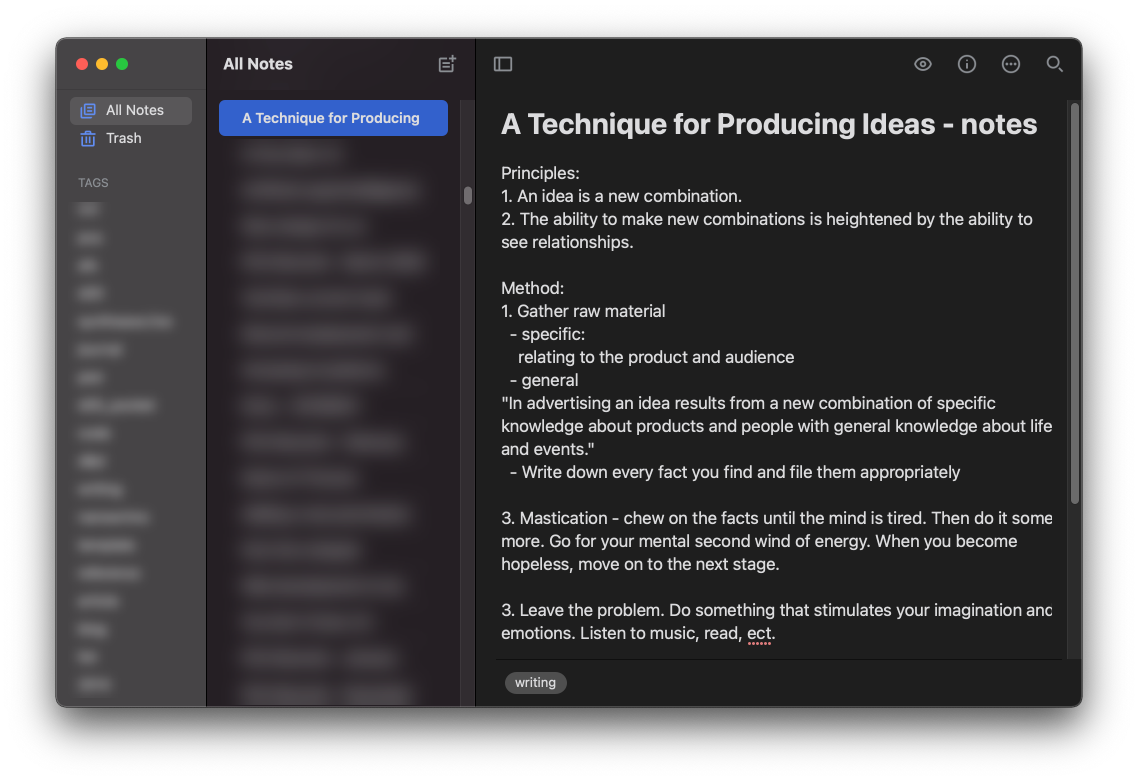
System Information:
- Experienced on both an 5k iMac and a MacBook Pro
- macOS 11.1 Big Sur
- Simplenote 2.6
- _System Preferences_ > _General_ > _Show scroll bars: Always_
Contributor guide
Research direction
No file or test is identified. Reproduce the problem in Simplenote for macOS with enough tags to overflow the list and macOS set to show scroll bars always; the work is done when the tag list provides a mouse-draggable scrollbar while preserving the available space.
Written by the indexing model from the issue text.
Assessment
- Tech stack
- swift
- Domain
- accessibility, desktop
- Issue type
- Bug
- Difficulty
- 3/5
- Estimated time
- 1-2 days
- Activity status
- Stale
- Clarity
- Mostly clear
- Newbie friendliness
- 45/100