Automattic / Automattic/simplenote-macos
Cmd+K to create links
- Dominant language
- Swift
- Stars
- 1.6k
- Forks
- 172
- Avg merge
- 11h 17m
- Merged PRs (30d)
- 3
Description
### What
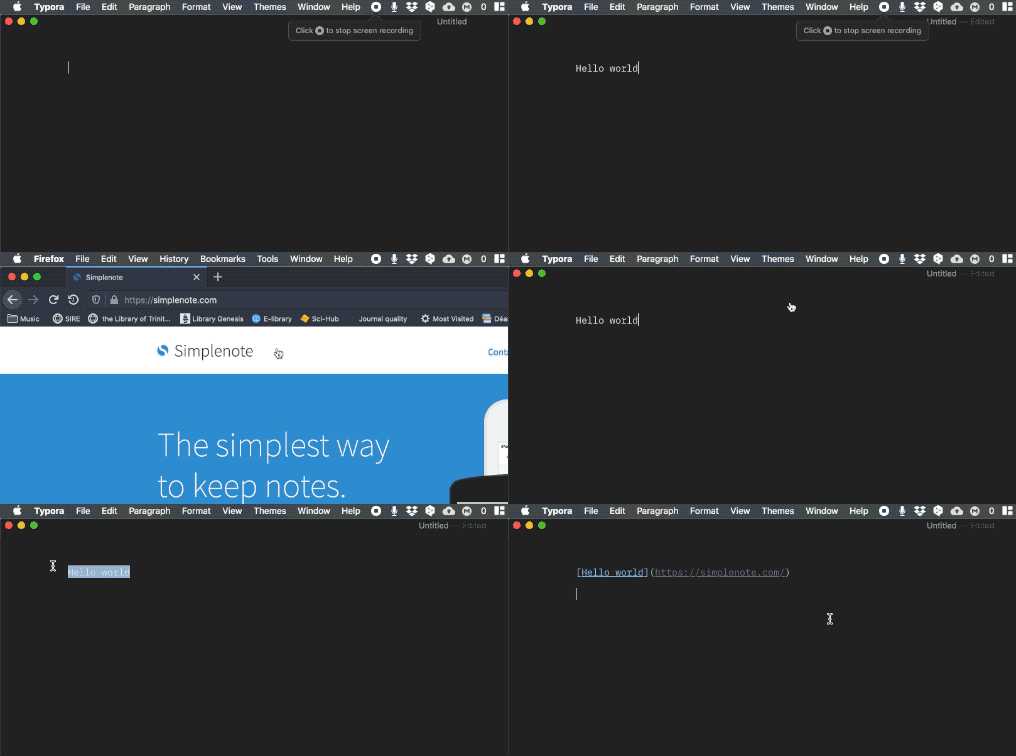
When a text is highlighted, hitting Cmd+K will transform it to a link to the URL in the "copy" memory (i.e., the link that would be pasted should we press on Cmd+V).
### Why
Links in Markdown can be a bit cumbersome. I use simplenote to store many links and this feature would make simplenote much more productive for me. Besides, Cmd+K is a well-known shortcut for creating links in Markdown (e.g., [Typora](https://support.typora.io/Shortcut-Keys/#format), or even GitHub). Greater compatibility between Markdown editors is always a plus.
### How
Contributor guide
Research direction
The issue names no files or tests; begin by locating the macOS Markdown editor and the existing Cmd+V clipboard handling. Verify the highlighted text becomes a Markdown link using the URL currently in the copy memory, and confirm the behavior with the illustrated Cmd+K workflow.
Written by the indexing model from the issue text.
Assessment
- Tech stack
- swift
- Domain
- desktop
- Issue type
- Feature
- Difficulty
- 4/5
- Estimated time
- 3-5 days
- Activity status
- Stale
- Clarity
- Mostly clear
- Newbie friendliness
- 42/100