Automattic / Automattic/simplenote-macos
Editor: Hiragana conversion display issue
- Dominant language
- Swift
- Stars
- 1.6k
- Forks
- 172
- Avg merge
- 11h 17m
- Merged PRs (30d)
- 3
Description
I confirmed that this also happens with ATOK and the standard Japanese IME built in to macOS.
_[Originally reported](https://github.com/Automattic/simplenote-electron/issues/909) by @naokomc_:
#### Steps to reproduce
1. Add [Google IME Japanese](https://www.google.co.jp/ime/) to your Mac
2. Select hiragana = "ひらがな (Google)" as your input method
3. Start typing "kyo" in a Simplnote note and select one of the date formats
4. You get a garbled text as a preview
5. When you actually select a date format, the confirmed text is displayed correctly.
#### OS version
macOS Sierra 10.12.6
#### Screenshot / Video
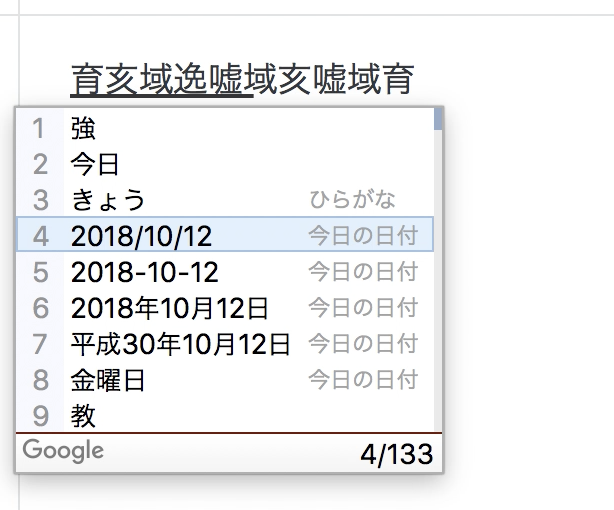
Video: https://cloudup.com/cyndeSf1ZC1
Contributor guide
Research direction
Start by reproducing the issue on macOS with Google IME Japanese, ATOK, or the standard Japanese IME, following the listed steps and observing the date-format preview. The issue does not name a source file or test, so trace the editor's handling of unconfirmed Japanese input. Done means the preview remains readable during Hiragana conversion and the confirmed date-format text remains correct.
Written by the indexing model from the issue text.
Assessment
- Tech stack
- macos, swift
- Domain
- desktop, internationalization
- Issue type
- Bug
- Difficulty
- 4/5
- Estimated time
- 3-5 days
- Activity status
- Stale
- Clarity
- Mostly clear
- Newbie friendliness
- 35/100