Automattic / Automattic/simplenote-ios
Share extension buttons are not visible in light mode
- Dominant language
- Swift
- Stars
- 2.2k
- Forks
- 297
- Avg merge
- 13h 25m
- Merged PRs (30d)
- 6
Description
(Originally filed here → https://github.com/wordpress-mobile/WordPress-iOS/issues/14157)
When using WordPress iOS with light mode on, the share extension's `Cancel` and `Save` buttons have white text. The buttons still work, they are just not visible. The buttons _are_ visible in dark mode:
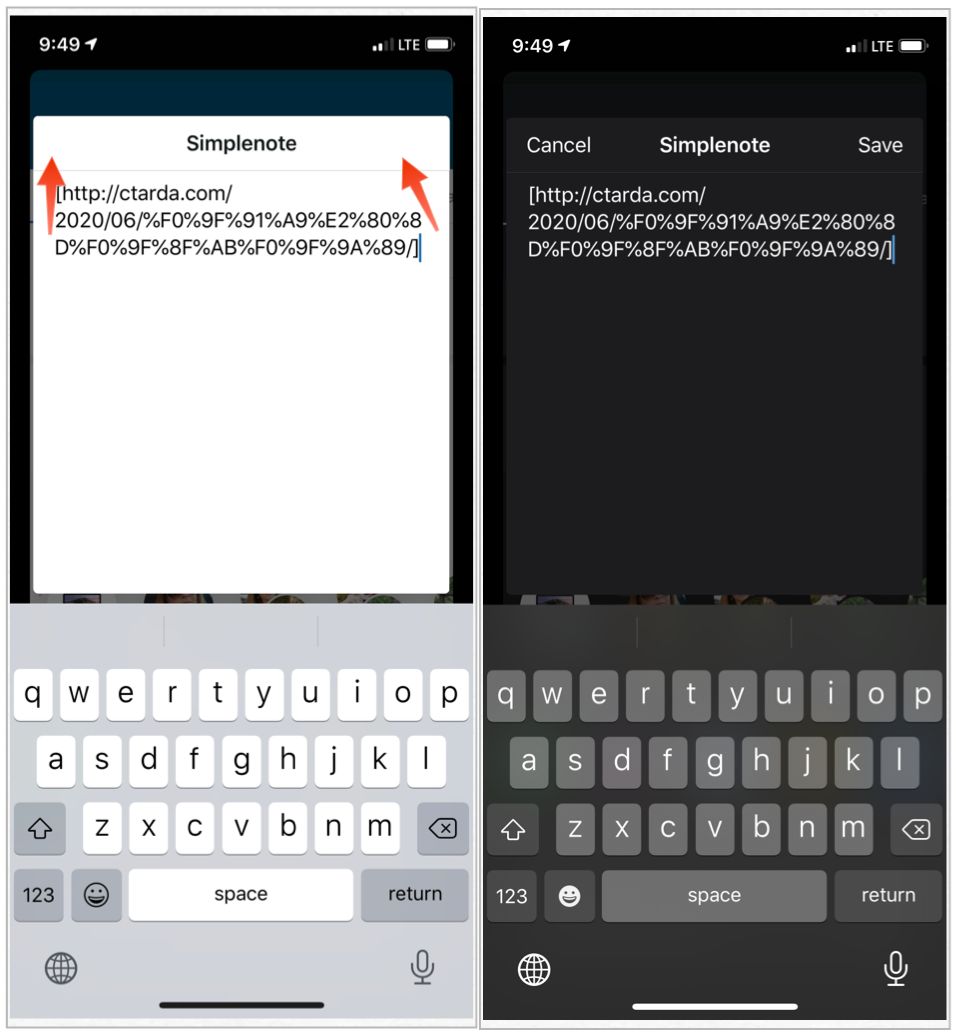
When testing this in other apps (e.g. Safari), everything displays correctly.
### To repro
1. In Settings.app, turn on light mode
2. In WPiOS, initiate share to Simplenote. (e.g.: on a post, tap the Share nav bar button and select Simplenote)
3. When the share view appears, notice cancel and Save are hidden (white text...buttons still work).
_Simplenote 4.19
iPhone 11 Pro
iOS v13.5.1_
Contributor guide
Assessment
This issue has not been assessed yet.