Automattic / Automattic/simplenote-ios
Keyboard defaults to Proper Case in markdown lists
Nobody has claimed this yet.
- Dominant language
- Swift
- Stars
- 2.1k
- Forks
- 297
- Avg merge
- 13h 25m
- Merged PRs (30d)
- 6
Description
Expected
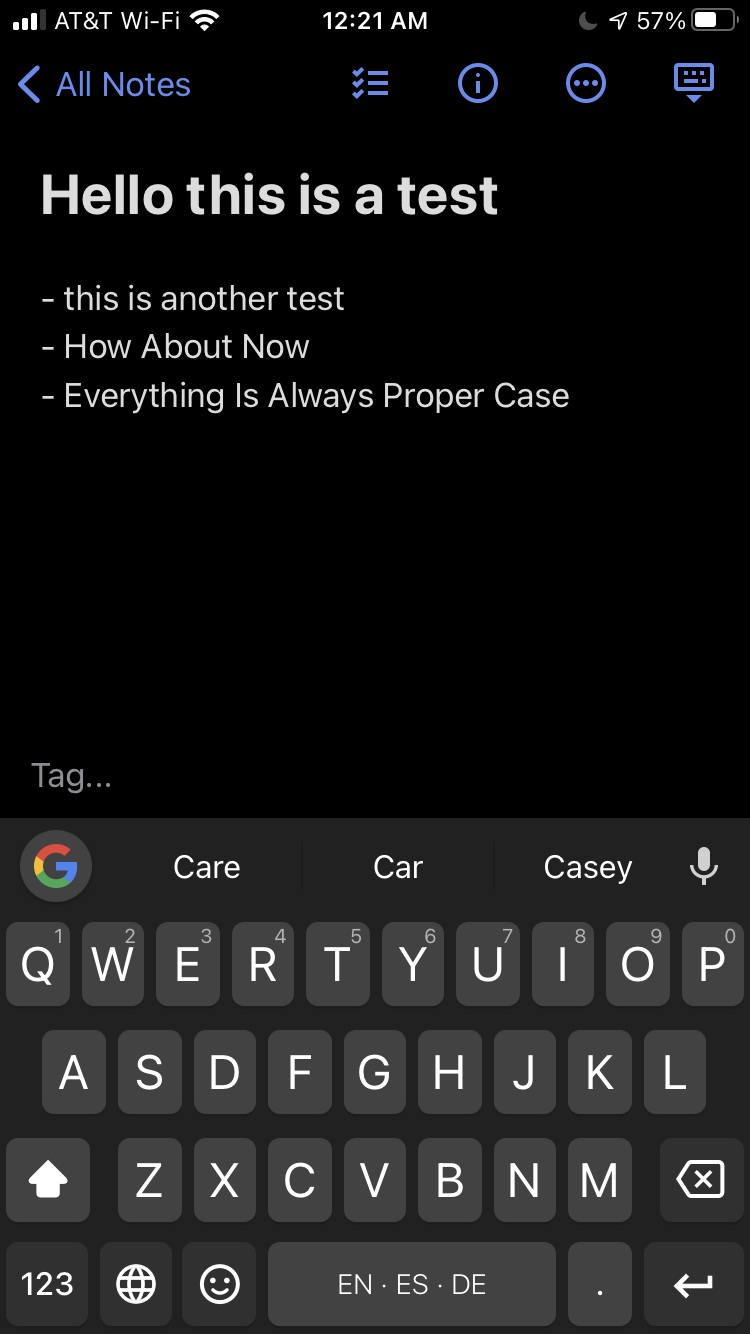
When creating new list items using markdown syntax, the new item should cue the keyboard to use lower case.
Observed
When I hit the carriage return on my on-screen iOS Gboard at the end of a Markdown list item, the new line is in Proper Case. This means that each new word I type/swipe will be capitalized.
Reproduced
- Open Simplenote, logged into an account (using Gboard?, I’m not sure it matters)
- Create a new note
- Type a title, and two carriage returns
- Begin a markdown list by typing a hypen followed by a space and a couple words
- Insert a carriage return and type a few words. This line will be in Proper Case.
Make|Model|iOS Version|App Version
Apple|iPhone SE 2020|14.2|4.28
Apple|iPhone SE 2020|14.2|4.29
DEVICE_MAKE|DEVICE_MODEL|IOS_VERSION|APP_VERSION
Contributor guide
First steps
- Read the whole issue, then the project's contributing guide.
- Comment on the issue to say you are picking it up — it saves two people doing the same work.
- Fork the repository and make your change on a branch.
- Open a pull request that references the issue number.
Research direction
Reproduce the issue on an iPhone by creating a Markdown list and pressing return after a list item. Trace the iOS Markdown list handling and keyboard capitalization behavior; done means newly created list items no longer force Proper Case.
Written by the indexing model from the issue text.
Assessment
- Tech stack
- ios, swift
- Domain
- mobile
- Issue type
- Bug
- Difficulty
- 3/5
- Estimated time
- 1-2 days
- Activity status
- Stale
- Clarity
- Mostly clear
- Newbie friendliness
- 35/100