Automattic / Automattic/simplenote-android
Display issues with long tags
- Dominant language
- Java
- Stars
- 1.9k
- Forks
- 318
- Avg merge
- 15h 23m
- Merged PRs (30d)
- 5
Description
While adding a very long tag, it was nicely truncated (by the keyboard) with a "..." in the middle as I typed it.
However once it is added, the "Add tag" is pushed off-screen, and in fact I'm not sure I can add any other tags, since once I tap into the tag area, the X is at the far right:

As I was testing this I figured out that I can swipe this field to the left or right, but maybe it would be nicer to scroll it over so that there's some space to add a second tag.
In the tag autocomplete, these tags are also just cut off:
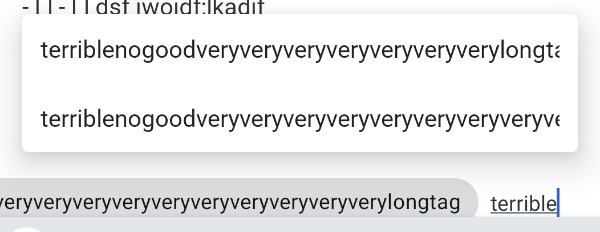
In the tag list, there's also no indication that they are truncated:

Device: Google Pixel 2, Android 10.0.0 (emulated)
Simplenote Version: Develop
Contributor guide
Research direction
Reproduce the long-tag behavior on Android 10 using the tag input, autocomplete, and tag list shown in the report. Trace how each tag area handles long text and horizontal space. Done means long tags remain usable, another tag can be added, and truncation is visibly indicated where needed.
Written by the indexing model from the issue text.
Assessment
- Tech stack
- android, java
- Domain
- mobile
- Issue type
- Bug
- Difficulty
- 3/5
- Estimated time
- 1-2 days
- Activity status
- Stale
- Clarity
- Mostly clear
- Newbie friendliness
- 35/100