Automattic / Automattic/node-canvas
`measureText` rounds `width` value when `canvas` is built with Pango version >=1.50.0
- Dominant language
- JavaScript
- Stars
- 10.7k
- Forks
- 1.2k
- Avg merge
- 4d 8h
- Merged PRs (30d)
- 1
Description
## Issue or Feature
- [x] If this is an issue with installation, I have read the [troubleshooting guide](https://github.com/Automattic/node-canvas/issues/1511).
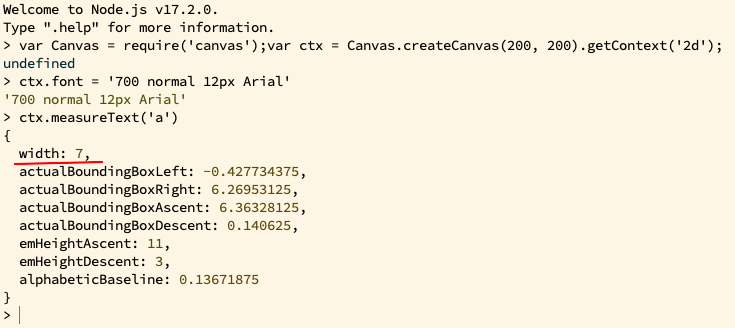
TLDR: [After Pango update via homebrew from version 1.48.10 to 1.50.0](https://github.com/Homebrew/homebrew-core/commits/master/Formula/pango.rb), and rebuilding `canvas` with it via simple `npm i`, `ctx.measureText` started to return rounded values for `width` instead of fractional, as it should.
Rounded value
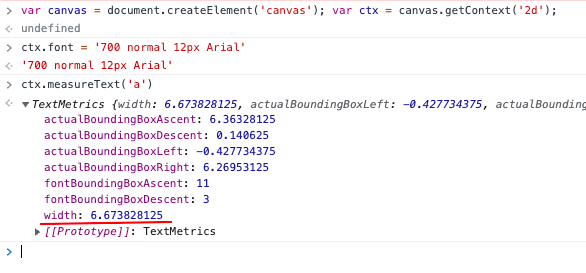
Correct fractional value, currently seen in Chrome:
--
We use node-canvas locally on ARM Macs, so we had to build it instead of installing a binary. Per installation instructions we did `brew install pkg-config cairo pango libpng jpeg giflib librsvg`.
A short time ago our tests started to fail with errors in code that uses `ctx.measureText`.
After some trial and error I pinpointed this issue to the newer version of Pango.
## Steps to Reproduce
On a M1 Mac with previously working `canvas`:
1. `brew upgrade`
2. make sure `brew info pango` shows version greater than 1.48.10, i.e. 1.50.1.
3. remove previously built canvas `rm -r node_modules/canvas`
4. `npm i canvas`
5. run Node REPL: `node`
6. run this code inside of it:
```js
var Canvas = require('canvas');
var canvas = Canvas.createCanvas(200, 200);
var ctx = canvas.getContext('2d');
ctx.font = '700 normal 12px Arial';
ctx.measureText('a'); // returns `{ width: 7, ...}`, but should return `{ width: 6.673828125, ...}`
```
## Your Environment
* canvas@2.8.0
* node 17.2.0 on Mac OS X 11.5.2 — but it doesn't matter, what matters is Pango version >1.48.10
## Current workaround #
1. Install Pango 1.48.10:
- `cd $(brew --repository)/Library/Taps/homebrew/homebrew-core`
- `git checkout 6a8cb0de908cf6eaddb4404cf6d953945e0413ce -- Formula/pango.rb` (it's a homebrew [commit](https://github.com/Homebrew/homebrew-core/commit/6a8cb0de908cf6eaddb4404cf6d953945e0413ce#diff-96679b9d5bc17dbe6f008089daa3c82a99caa0dd9894829166ff8330e52bfdb6) with pango 1.48.10)
- `brew uninstall --ignore-dependencies pango`
- `HOMEBREW_NO_AUTO_UPDATE=1 brew install pango`
2. Rebuild `canvas`:
- `cd `
- `rm -r node_modules/canvas`
- `npm i`
Contributor guide
No contributing guide indexed for this repository
Assessment
This issue has not been assessed yet.