Automattic / Automattic/node-canvas
gradient color is 'transparent' by browser is inconsistent with that drawn by server.
- Dominant language
- JavaScript
- Stars
- 10.7k
- Forks
- 1.2k
- Avg merge
- 4d 8h
- Merged PRs (30d)
- 1
Description
## Issue
browser is inconsistent with that drawn by server.
if change transparent to `#00000000`,it works
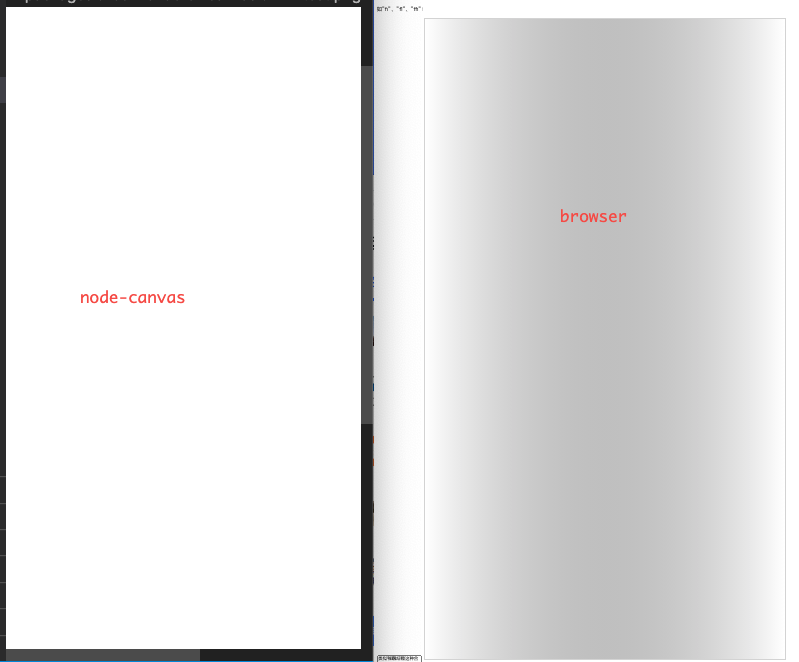
It looks like a white background covers the gradient background
## Steps to Reproduce
```js
const { createCanvas } = require('canvas')
const canvas = createCanvas(1080, 1920)
const ctx = canvas.getContext('2d')
var grd=ctx.createLinearGradient(0, 960, 1080, 960);
grd.addColorStop(0,"transparent");
grd.addColorStop(1,"#ffffff");
ctx.fillStyle = '#fff'
ctx.fillRect(0, 0, 1080, 1920)
ctx.fillStyle=grd;
ctx.fillRect(0, 0, 1080, 1920);
const fs = require('fs')
const out = fs.createWriteStream(__dirname + '/test.png')
const stream = canvas.createPNGStream()
stream.pipe(out)
```
## Your Environment
* node-canvas 2.6.1
* Environment (node v14.15.2 on Mac OS X 10.15.6):
Contributor guide
No contributing guide indexed for this repository
Assessment
This issue has not been assessed yet.