Automattic / Automattic/node-canvas
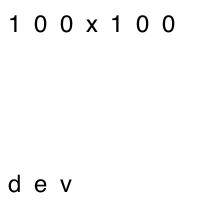
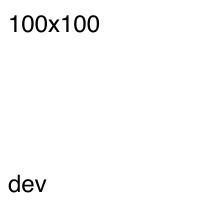
`ctx.fillText` with `ctx.scale` behaves poorly in pre-compiled instalation (OSX)
- Dominant language
- JavaScript
- Stars
- 10.7k
- Forks
- 1.2k
- Avg merge
- 4d 8h
- Merged PRs (30d)
- 1
Description
```ts
//...
// width: 100, height: 100, scale: 2
const canvas = createCanvas(width * scale, height * scale);
const ctx = canvas.getContext("2d");
ctx.scale(scale, scale);
ctx.fillStyle = "white";
ctx.fillRect(0, 0, width, height);
if (dev) {
ctx.fillStyle = "black";
ctx.font = "12px Sans-Serif";
ctx.fillText("dev", 4, height - 4);
}
ctx.fillStyle = "black";
ctx.font = "12px Sans-Serif";
ctx.fillText(`${width}x${height}`, 4, 16);
//...
```
Installing with `npm install canvas`
After using `npm install canvas --build-from-source`
## Steps to Reproduce
My repository: https://github.com/Kristonitas/imaginer
Earliest commit with the issue: https://github.com/Kristonitas/imaginer/tree/3f7564a73cf2f323755410d4115b4ce4d521d428
Edit the `index.ts` to have scaling enabled (I used `2`): `const imageStream = render(width, height, { dev, scale: 2 });`
When running locally, open http://localhost:3000/100/100
## Environment
* `canvas@2.6.1`
* `npm@6.13.4`
* `System Version: macOS 10.15.1 (19B88)`
## P. S.
While installing, I had to manually execute `export PKG_CONFIG_PATH="/usr/local/opt/libffi/lib/pkgconfig"`
Would make a simpler reproduction case, but since the issues is solved just by recompiling, I don't see it worth the effort.
Contributor guide
No contributing guide indexed for this repository
Assessment
This issue has not been assessed yet.