Automattic / Automattic/jetpack
Infinite scroll settings inconsistency
- Dominant language
- PHP
- Stars
- 1.8k
- Forks
- 898
- Avg merge
- 1d 18h
- Merged PRs (30d)
- 774
Description
Infinite scroll settings are in two places and look different.
Basically, the feature is enabled in one place and some of its settings are adjusted in another place.
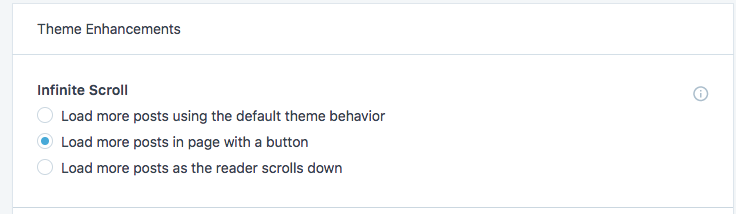
Jetpack settings → Writing `/wp-admin/admin.php?page=jetpack#/settings`
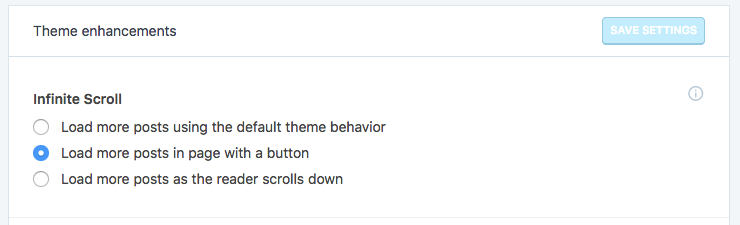
Settings → Reading `/wp-admin/options-reading.php`

Note how the other one is under "Writing" and other under "Reading".
These settings aren't visible if _"Load more posts using the default theme behaviour"_ is chosen from Jetpack.
Noting that in Calypso there is no "save settings" button and setting gets saved on each radio-button press:
### What I expected:
Have all the settings in one place under Jetpack's "Writing" page.
Contributor guide
Research direction
Start at the Jetpack Writing settings entry point (/wp-admin/admin.php?page=jetpack#/settings) and the Reading settings page (/wp-admin/options-reading.php), comparing where infinite scroll is enabled and configured. Done means the related settings are presented together under Jetpack’s Writing page and the radio-button changes continue to save correctly.
Written by the indexing model from the issue text.
Assessment
- Tech stack
- php
- Domain
- frontend
- Issue type
- Feature
- Difficulty
- 4/5
- Estimated time
- 3-5 days
- Activity status
- Stale
- Clarity
- Mostly clear
- Newbie friendliness
- 32/100