Automattic / Automattic/jetpack
Social Media Icons widget: Enqueuing Genericons Neue in theme breaks widget
- Dominant language
- PHP
- Stars
- 1.8k
- Forks
- 898
- Avg merge
- 1d 18h
- Merged PRs (30d)
- 774
Description
When you enqueue [Genericons Neue](https://github.com/Automattic/genericons-neue) in a theme, it causes the icons to stop appearing in the Social Media Icons widget.
From what I can tell, this is because using the word 'genericons' in a enqueue handle returns a partial match for the code here, even if it's prefixed or followed by another word (for example, `genericons-neue`, or `themename-genericons-neue`): https://github.com/Automattic/jetpack/blob/bf9cb853ec267728d8aae4dcacd2fe29b05ae288/modules/widgets/social-media-icons.php#L102-L110
#### Steps to reproduce the issue
1. Take any theme that doesn't use Genericons (for example, Twenty Seventeen).
2. Add the Social Media Icons widget, and add at least one icon. Check to see that the icon is displaying correctly.
3. In the theme's functions.php, add the following to the other enqueued files in the `themename_scripts()` function (you don't need to actually add the Genericons Neue files, just the handle):
```
// Add Genericons, used in the main stylesheet.
wp_enqueue_style( 'genericons-neue', get_template_directory_uri() . '/genericons-neue/Genericons-Neue.css', array(), '4.0.5' );
```
#### What I expected
The icons under the Social Media Icons widget would still display.
#### What happened instead
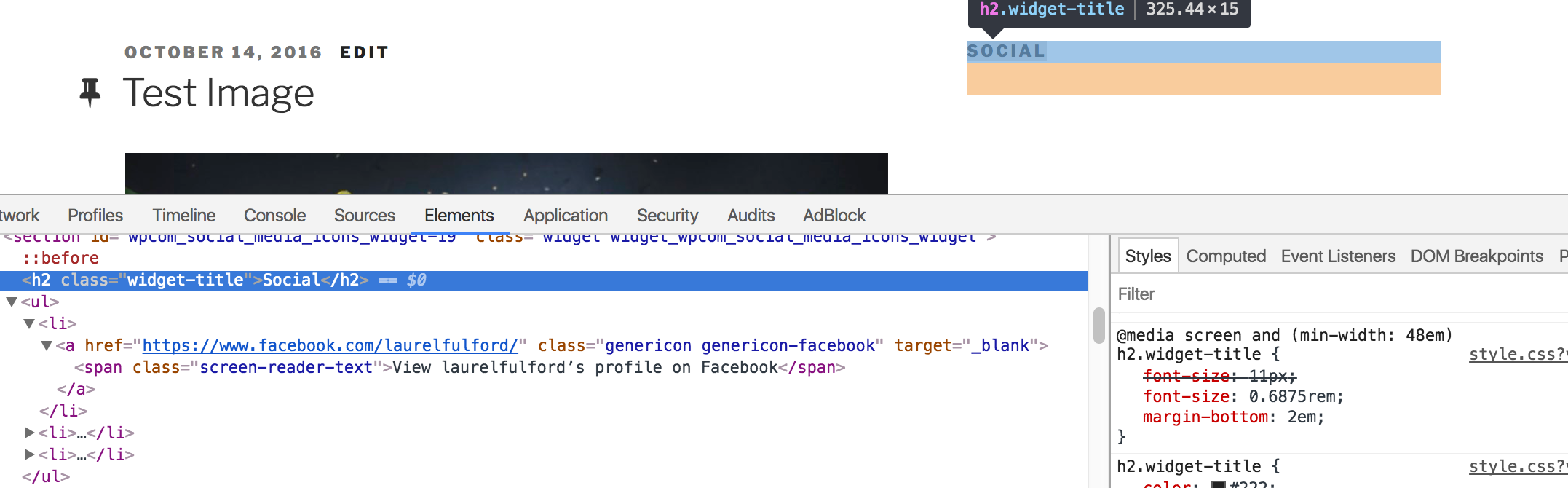
The icons no longer display. When inspected, it shows the markup is still there but styles coming from Genericons are not; by viewing source, it shows genericons.css is no longer enqueued.
Contributor guide
Research direction
Start in modules/widgets/social-media-icons.php around lines 102-110 and reproduce the issue by enqueueing a style with the genericons-neue handle in a theme. Trace how the enqueue handle is matched and verify that Genericons Neue no longer suppresses genericons.css, while the Social Media Icons widget icons remain visible.
Written by the indexing model from the issue text.
Assessment
- Tech stack
- php, wordpress
- Domain
- frontend, web-dev
- Issue type
- Bug
- Difficulty
- 2/5
- Estimated time
- 1-3 hours
- Activity status
- Stale
- Clarity
- Clearly specified
- Newbie friendliness
- 50/100