Automattic / Automattic/jetpack
Related Posts: thumbnails are not displayed correctly (aspect ratio is not preserved) if block theme is used
- Dominant language
- PHP
- Stars
- 1.8k
- Forks
- 898
- Avg merge
- 1d 18h
- Merged PRs (30d)
- 774
Description
### Impacted plugin
Jetpack
### Steps to Reproduce
1. Activate Twenty Twenty-Three theme
2. Activate the Related Posts feature under Jetpack > Settings > Traffic
3. Create a few posts (4) with featured images
4. Add **Related Posts** blog to the post, make sure to check **Display thumbnails** in the Related Posts settings
5. Visit the post in the front-end view, make sure that your viewport size is larger than 640px
### A clear and concise description of what you expected to happen.
Thumbnails are displayed using their correct aspect ratios.
### What actually happened
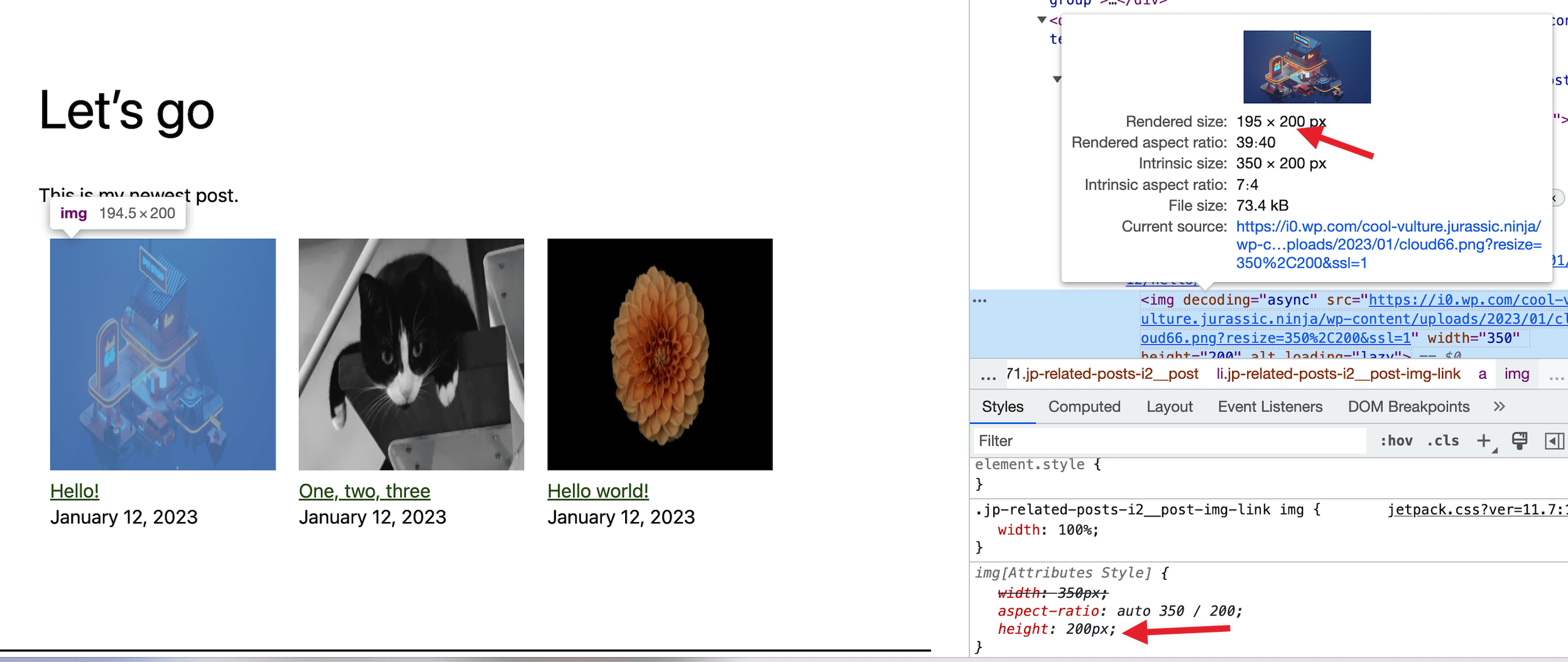
You will notice that the aspect ratio of thumbnails is not preserved.
When you check the styles applied to the image, you will notice that the following `width` rule is applied:
```
.jp-related-posts-i2__post-img-link img {
width: 100%;
}
```
**but there is no rule for height** (like `height:auto`). In that case, the browser uses the `height` attribute from the `img` markup (200px) instead.
### Browser
Google Chrome/Chromium, Mozilla Firefox, Microsoft Edge, Apple Safari
### Other information
The issue does not occur in (probably most) classic themes since they add general rules for `img`, for instance Twenty Twenty-One adds this rule:
```
img {
height: auto;
max-width: 100%;
vertical-align: middle;
}
```
### Platform (Simple, Atomic, or both?)
Self-hosted
### Reproducibility
Consistent
### Severity
Some (< 50%)
### Available workarounds?
Yes, easy to implement
### Workaround details
Go to /wp-admin/customize.php > Additional CSS and add
```
img {
height: auto;
max-width: 100%;
}
```
Contributor guide
Research direction
Reproduce the issue with Jetpack Related Posts enabled on Twenty Twenty-Three, using four posts with featured images and a viewport wider than 640px. Inspect the `.jp-related-posts-i2__post-img-link img` styles and confirm the fix preserves thumbnail aspect ratios in the front end without relying on Additional CSS.
Written by the indexing model from the issue text.
Assessment
- Tech stack
- css, php, wordpress
- Domain
- frontend, web-dev
- Issue type
- Bug
- Difficulty
- 2/5
- Estimated time
- 1-3 hours
- Activity status
- Stale
- Clarity
- Mostly clear
- Newbie friendliness
- 35/100