Automattic / Automattic/jetpack
Widget Visibility: Page Visibility on Non-Legacy Widgets Doesn't Allow Including Children
- Dominant language
- PHP
- Stars
- 1.8k
- Forks
- 898
- Avg merge
- 1d 18h
- Merged PRs (30d)
- 774
Description
### Impacted plugin
Jetpack
### Steps to Reproduce
1. Turn on Jetpack's Widget Visibility
2. Add a legacy widget to a widget area (for example, meta)
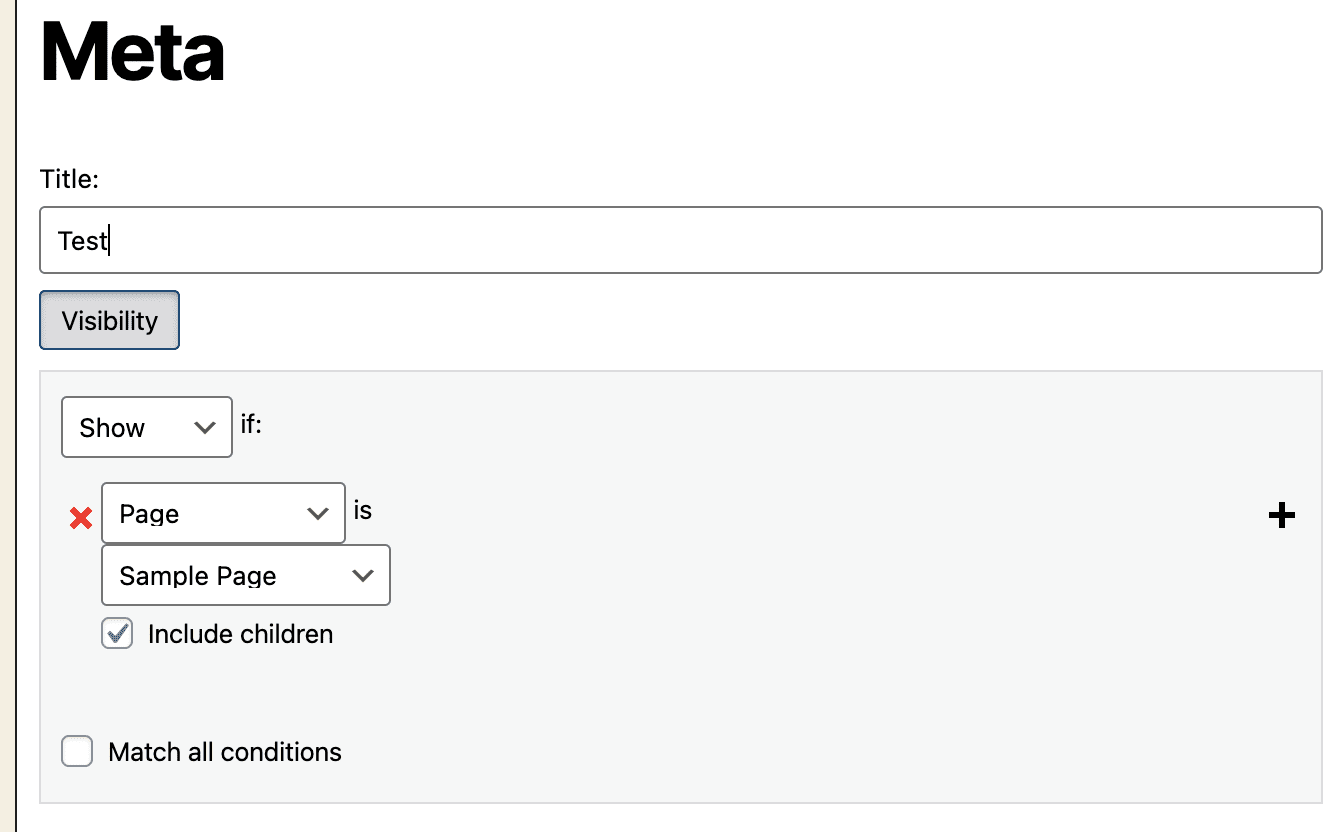
3. You can select to show/hide a widget if a page and its children match via a checkbox
4. Add a non-legacy widget and select visibility
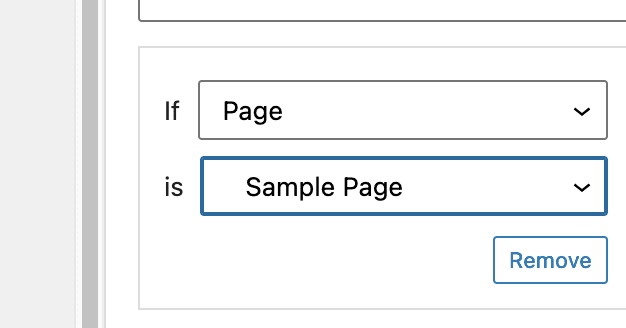
5. There is no option to select children pages
### A clear and concise description of what you expected to happen.
Visibility on non-legacy widgets should have the same option
### What actually happened
The non-legacy widget doesn't have the "Include Children" option
### Other information
Screenshot of legacy widget visibility:
Screenshot of non-legacy widget visibility:
Originally reported here:
https://wordpress.org/support/topic/jetpack-widget-visibility-setting/?view=all
### Operating System
macOS
### OS Version
12.1
### Browser
Firefox
### Browser Version(s)
Latest
Contributor guide
Research direction
Reproduce the difference between legacy and non-legacy widgets in Jetpack's Widget Visibility settings, using the steps and screenshots in the issue as the starting point. Compare both visibility controls and confirm that non-legacy widgets expose the same “Include Children” option and apply it correctly.
Written by the indexing model from the issue text.
Assessment
- Tech stack
- wordpress
- Domain
- frontend
- Issue type
- Bug
- Difficulty
- 3/5
- Estimated time
- 1-2 days
- Activity status
- Stale
- Clarity
- Mostly clear
- Newbie friendliness
- 35/100