Automattic / Automattic/jetpack
Enhancement: Use appropriate image size for Instagram latest posts widget
- Dominant language
- PHP
- Stars
- 1.8k
- Forks
- 898
- Avg merge
- 1d 18h
- Merged PRs (30d)
- 774
Description
### Impacted plugin
Jetpack
### What
Serve a version of the images that is close to the size they will be rendered.
### How
To see the issue, add an 'Instagram latest posts' block with 9 images, 3 columns, to a widget area and view the page.
The images are rendered small, e.g. 159x159, but their intrinsic size is much larger e.g 1080x752:
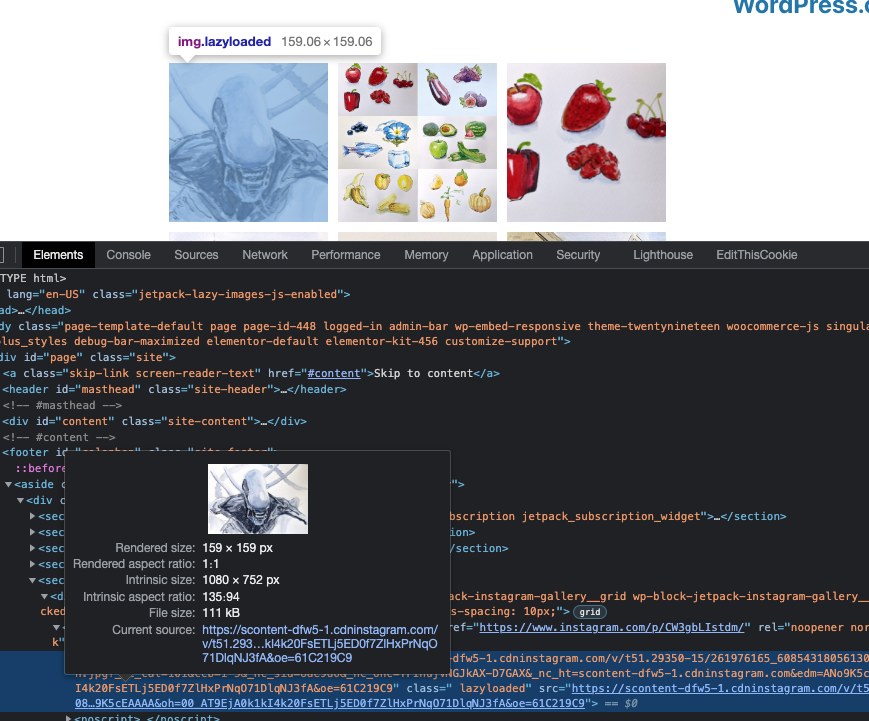
Can we render the images at a smaller size to save some load time, as requested here?
https://wordpress.org/support/topic/instagram-widget-image-size/
Contributor guide
Research direction
Inspect the Jetpack Instagram latest posts block in a widget area and reproduce the nine-image, three-column case described in the issue. Compare the rendered image dimensions with their intrinsic dimensions, then verify that the widget serves images close to their display size and that the page loads less image data.
Written by the indexing model from the issue text.
Assessment
- Tech stack
- php, wordpress
- Domain
- frontend, performance
- Issue type
- Feature
- Difficulty
- 3/5
- Estimated time
- 1-2 days
- Activity status
- Stale
- Clarity
- Mostly clear
- Newbie friendliness
- 35/100