Automattic / Automattic/jetpack
Support Multi-Line LaTeX Formatting
- Dominant language
- PHP
- Stars
- 1.8k
- Forks
- 898
- Avg merge
- 1d 18h
- Merged PRs (30d)
- 774
Description
#### Is your feature request related to a problem? Please describe.
The markdown block does not include support for multi-line LaTeX.
#### Describe the solution you'd like
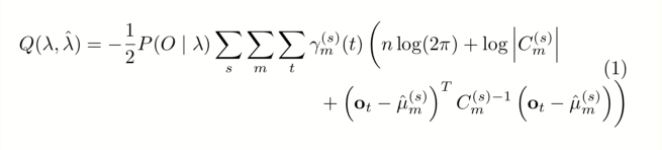
Instead of using $latex prefix and and $ suffix for full equations with no line-breaks in all cases, can we add support for multi-line LaTeX. Example on how it could be used below.
Original equation:
```
$latex Q(\lambda,\hat{\lambda}) = -\frac{1}{2} P{(O \mid \lambda )} \sum_s \sum_m \sum_t \gamma_m^{(s)} (t)\left( n \log(2 \pi ) + \log \left| C_m^{(s)} \right| + \left( \mathbf{o}_t - \hat{\mu}_m^{(s)} \right) ^T C_m^{(s)-1} \left(\mathbf{o}_t - \hat{\mu}_m^{(s)}\right) \right)$
```
Which outputs:

We could instead use this:
```
\documentclass{article}
\usepackage{amsmath}
\begin{document}
\begin{equation}
X=
\begin{cases}
0, & \text{if}\ a=1 \\
1, & \text{otherwise}
\end{cases}
\end{equation}
\end{document}
```
Which outputs:
#### Describe alternatives you've considered
[Stack exchange discussion](https://tex.stackexchange.com/questions/3782/how-can-i-split-an-equation-over-two-or-more-lines), it can be done with an additional plugin, but if we could build the support directly and add on the LaTeX that already works, while making long equations easier to understand on the web, that seems ideal.
#### Additional context
Filled in this repo, due to [this request to show a preview of LaTeX within the block](https://github.com/Automattic/jetpack/issues/13163).
Contributor guide
Research direction
Start by locating the markdown block and its existing LaTeX handling, then compare the requested multi-line examples with the current behavior. Define the supported syntax and rendering expectations first; the work is done when multi-line equations render correctly without breaking existing LaTeX formatting.
Written by the indexing model from the issue text.
Assessment
- Tech stack
- latex
- Domain
- content
- Issue type
- Feature
- Difficulty
- 5/5
- Estimated time
- Over a week
- Activity status
- Stale
- Clarity
- Needs clarification
- Newbie friendliness
- 25/100