Automattic / Automattic/jetpack
Tiled Gallery Block - Reorder Arrows on Small Screens
- Dominant language
- PHP
- Stars
- 1.8k
- Forks
- 898
- Avg merge
- 1d 18h
- Merged PRs (30d)
- 774
Description
#### Is your feature request related to a problem? Please describe.
>A portrait image in the Tiled Gallery block can sometimes be too tight for both movement arrows to show up.
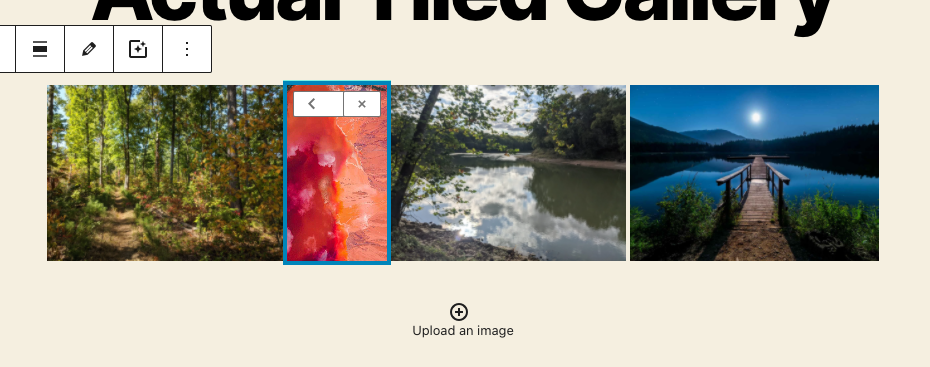
It seems this happens when the screen size is too small - instead of breaking, the arrows condense until it's impossible to use.
#### Describe the solution you'd like
Not sure the best solution, but maybe having the arrows break to new lines instead of condensing would at least make them usable?
p8oabR-DS-p2#comment-5196
Contributor guide
Research direction
The issue identifies the Tiled Gallery block and a small-screen arrow layout problem, but names no files, tests, or entry point. Start by locating that block's implementation and its responsive arrow styles; done means both movement arrows remain usable on narrow layouts with portrait images.
Written by the indexing model from the issue text.
Assessment
- Tech stack
- javascript, react, wordpress
- Domain
- frontend
- Issue type
- Feature
- Difficulty
- 3/5
- Estimated time
- 1-2 days
- Activity status
- Stale
- Clarity
- Mostly clear
- Newbie friendliness
- 30/100