Automattic / Automattic/jetpack
Dialog block: add keyboard controls for play/pause/skip audio player buttons
Open
[Block] Dialogue
[Focus] Accessibility
[Pri] Normal
[Size] S
New Feature
- Dominant language
- PHP
- Stars
- 1.8k
- Forks
- 898
- Avg merge
- 1d 18h
- Merged PRs (30d)
- 774
Description
Similar to https://github.com/Automattic/jetpack/issues/18276
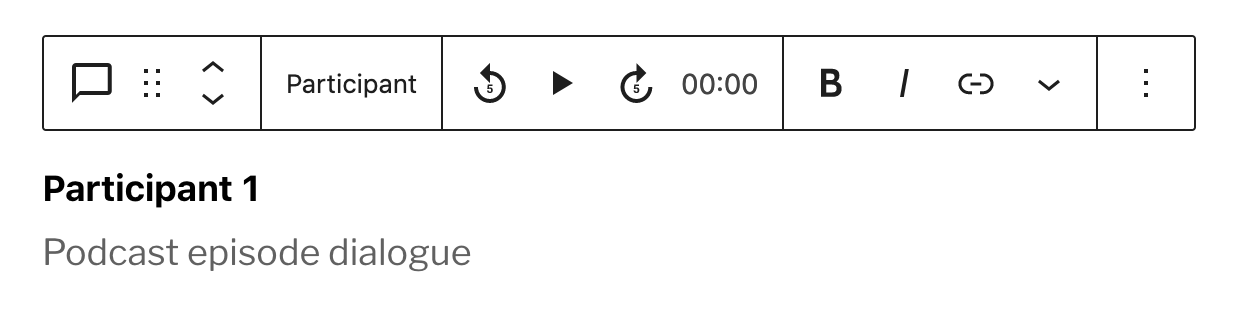
Add keyboard controls to the dialog block that allow play, pausing, and skipping forward/back without focusing the block toolbar, so that users can more easily create or edit a transcript of a podcast.
Contributor guide
Research direction
Start by reading the related issue at https://github.com/Automattic/jetpack/issues/18276 and locating the dialog block's audio player controls. Verify the existing play, pause, and skip-forward/back behavior, then define keyboard handling that works without focusing the block toolbar and supports transcript editing.
Written by the indexing model from the issue text.
Assessment
- Tech stack
- javascript, react
- Domain
- accessibility, frontend
- Issue type
- Feature
- Difficulty
- 3/5
- Estimated time
- 1-2 days
- Activity status
- Stale
- Clarity
- Mostly clear
- Newbie friendliness
- 45/100