Automattic / Automattic/jetpack
Markdown block: Some characters get converted to HTML entities
- Dominant language
- PHP
- Stars
- 1.8k
- Forks
- 898
- Avg merge
- 1d 18h
- Merged PRs (30d)
- 774
Description
#### Steps to reproduce
1. Add a markdown block to a post
2. Add a markdown quote, i.e. a line starting with the `>` character, and add a line of regular text containing a `&` character
3. Save or publish the post, and exit the editor
4. Reopen the post for editing
#### What I expected
To still see the markdown as I added it if I try to edit the block again.
#### What happened instead
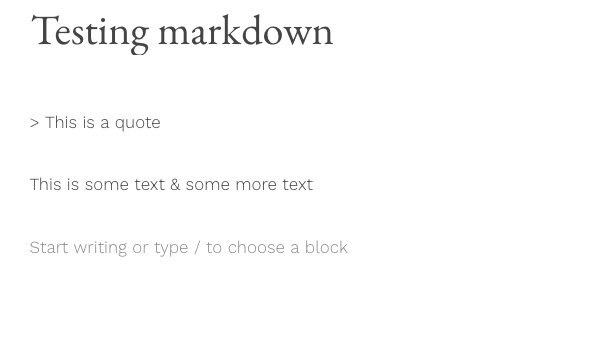
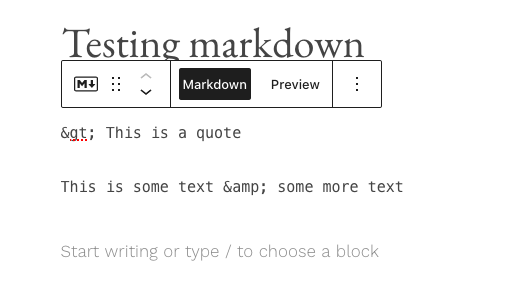
The `>` and `&` characters appear initially, but change into their respective HTML entities the moment I click on the markdown block itself to edit it.
#### Screenshot / Video
Markdown block unselected:
Markdown block selected:
#### Context / Source
Reported in the forums at https://wordpress.com/forums/topic/editing-posts-with-markdown-markup/
This only appears to happen on WordPress.com. I'm not able to replicate the same issue on a self-hosted site using Jetpack's markdown block.
Contributor guide
Assessment
This issue has not been assessed yet.