Automattic / Automattic/jetpack
Instagram Widget: Button state not updated when pop-up closed not connected
Open
[Feature] Extra Sidebar Widgets
[Pri] Low
Bug
- Dominant language
- PHP
- Stars
- 1.8k
- Forks
- 898
- Avg merge
- 1d 18h
- Merged PRs (30d)
- 774
Description
#### Steps to reproduce the issue
1. Go to `/wp-admin/widgets.php
2. Add Instagram Widget to one of the sidebars
3. Click on "Connect" button. Pop-up should appear
4. Close the pop-up without connecting IG account
5. See that button is still disabled and its text is "Connecting..."
**Screenshots**
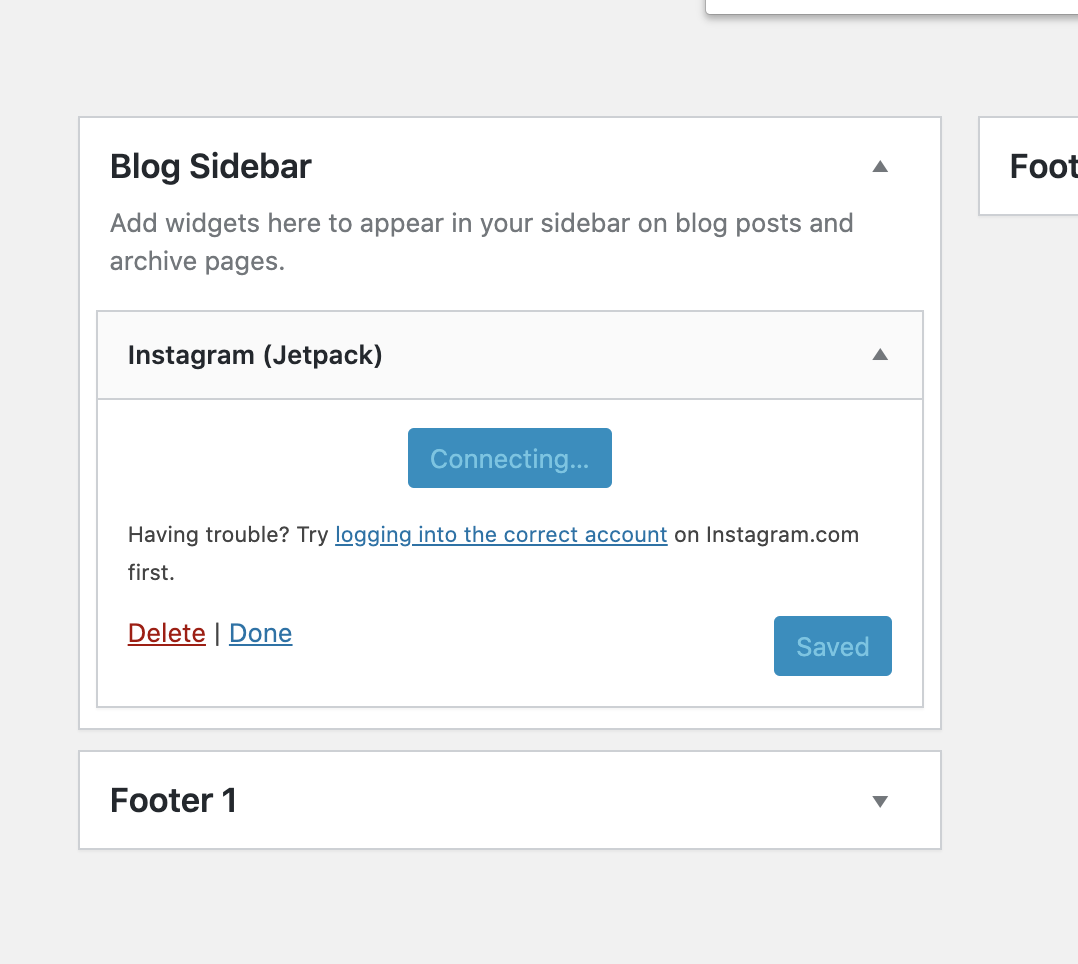
Contributor guide
Research direction
Start at /wp-admin/widgets.php and reproduce the Instagram Widget flow by clicking Connect, then closing the pop-up without connecting an account. Trace the Connect button handling and verify that after the pop-up closes, the button is enabled and no longer shows "Connecting...".
Written by the indexing model from the issue text.
Assessment
- Tech stack
- javascript, php, wordpress
- Domain
- frontend, web-dev
- Issue type
- Bug
- Difficulty
- 2/5
- Estimated time
- 1-3 hours
- Activity status
- Stale
- Clarity
- Mostly clear
- Newbie friendliness
- 48/100