Automattic / Automattic/jetpack
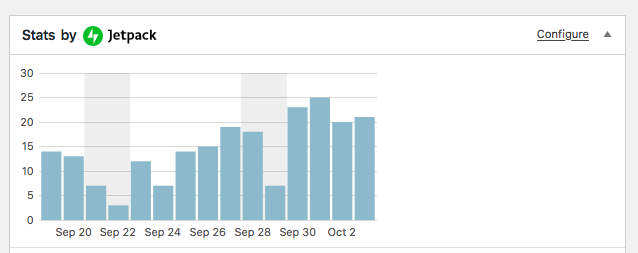
Stats Dashboard widget graph loads incorrectly when collapsed
- Dominant language
- PHP
- Stars
- 1.8k
- Forks
- 898
- Avg merge
- 1d 18h
- Merged PRs (30d)
- 774
Description
When the Stats dashboard widget is collapsed on page load, expanding the widget displays a graph that does not have the correct width.
#### Steps to reproduce the issue
1. Turn on Jetpack Stats module.
2. Make sure the widget is showing on the Dashboard
3. Collapse the widget.
4. Refresh the page.
5. Let the page finish loading.
6. Expand the widget.
#### What I expected
The graph should take up the full width of the widget.
Running WordPress 5.3-beta2-46373, Jetpack 7.8.
Contributor guide
Research direction
Reproduce the issue with the Stats module enabled and the dashboard widget collapsed before page load, using the WordPress and Jetpack versions listed. Start by locating the Stats dashboard widget and its graph rendering path; done means expanding the widget after refresh displays a graph at the full widget width.
Written by the indexing model from the issue text.
Assessment
- Tech stack
- php, wordpress
- Domain
- frontend
- Issue type
- Bug
- Difficulty
- 3/5
- Estimated time
- 1-2 days
- Activity status
- Stale
- Clarity
- Mostly clear
- Newbie friendliness
- 35/100