Automattic / Automattic/jetpack
Slideshow Block: Hide navigation buttons when in autoplay mode
- Dominant language
- PHP
- Stars
- 1.8k
- Forks
- 898
- Avg merge
- 1d 18h
- Merged PRs (30d)
- 774
Description
#### Describe the solution you'd like
The navigation buttons can become redundant when the Slideshow block is marked to autoplay.
Example: you are a hotel owner and are using the slideshow as a way to present some pictures of the rooms you offer. Those images are purely decoration and there's no need to have a proper navigation system.
An alternative, for now, is to use some CSS:
```
/* Slideshow Block (Autoplay mode): hide the navigation controls */
.wp-block-jetpack-slideshow[data-autoplay=true] .wp-block-jetpack-slideshow_button-prev,
.wp-block-jetpack-slideshow[data-autoplay=true] .wp-block-jetpack-slideshow_button-next,
.wp-block-jetpack-slideshow[data-autoplay=true] .wp-block-jetpack-slideshow_pagination,
.wp-block-jetpack-slideshow[data-autoplay=true] .wp-block-jetpack-slideshow_button-pause {
display: none !important;
}
```
#### Idea
Whenever you check `Autoplay`, we then see the Delay option. The idea is to see some extra features, presented on this mockup:
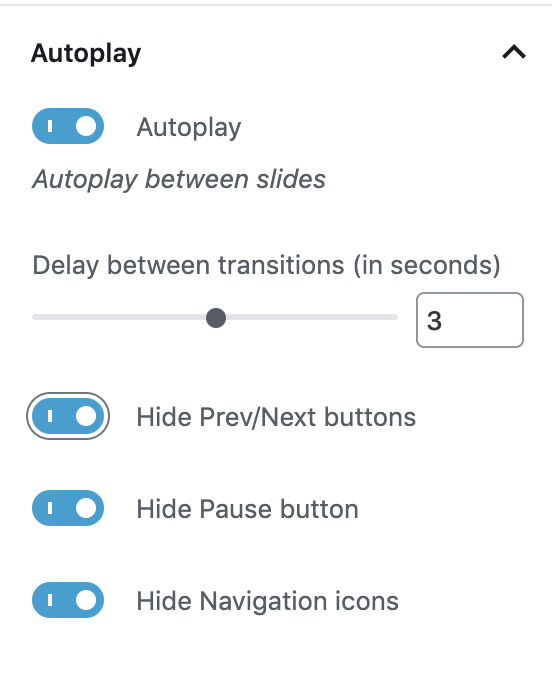
Thank you!
Contributor guide
Research direction
No source file or test is named; search the Slideshow block for the autoplay setting and the navigation-control selectors shown in the issue. Confirm the requested behavior against the mockup and CSS example: when autoplay is enabled, previous/next, pagination, and pause controls are hidden, while normal mode retains navigation.
Written by the indexing model from the issue text.
Assessment
- Tech stack
- css, javascript, react, wordpress
- Domain
- frontend
- Issue type
- Feature
- Difficulty
- 3/5
- Estimated time
- 1-2 days
- Activity status
- Stale
- Clarity
- Mostly clear
- Newbie friendliness
- 35/100