Automattic / Automattic/jetpack
Remove redundant charcoal color from our text
- Dominant language
- PHP
- Stars
- 1.8k
- Forks
- 898
- Avg merge
- 1d 18h
- Merged PRs (30d)
- 774
Description
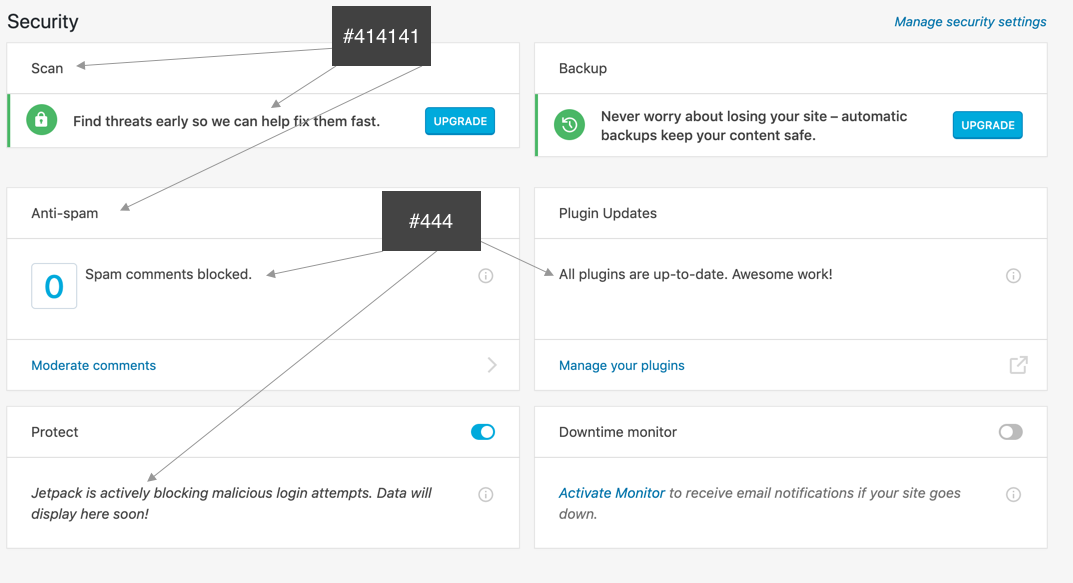
I've noticed that we're using two nearly identical charcoal colors for text. The body color is #444444 and some of classes overwrite it to #414141 for headings or bold text.
#### Steps to reproduce the issue
1. Go to Jetpack WP-Admin interface
2. The example is from At a Glance, but is prevalent elsewhere
#### What I expected
A single charcoal color across the interface
#### What happened instead
Two nearly identical colors being used interchangibly
#### Suggestion
Using the body color for text everywhere makes sense to me, but either charcoal works.
**Screenshots**
Contributor guide
Research direction
Start in the Jetpack WP-Admin interface by searching for the two colors, #444444 and #414141, across the relevant styles. The work is done when text uses one charcoal color consistently throughout the interface, including the At a Glance example.
Written by the indexing model from the issue text.
Assessment
- Tech stack
- css
- Domain
- design, frontend
- Issue type
- Refactor
- Difficulty
- 3/5
- Estimated time
- 1-2 days
- Activity status
- Stale
- Clarity
- Mostly clear
- Newbie friendliness
- 35/100