Automattic / Automattic/jetpack
Module Overrides: offer option to provide a reason for an override instead of the default
- Dominant language
- PHP
- Stars
- 1.8k
- Forks
- 898
- Avg merge
- 1d 18h
- Merged PRs (30d)
- 774
Description
#### Steps to reproduce the issue
1. Enable the Privates Sites Module
2. Navigate to Jetpack > Settings > Sharing
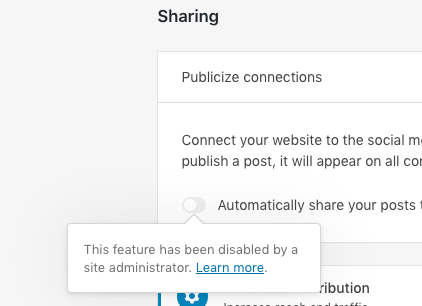
> It is nice we provide some information on why this feature is disabled when a site is marked as private. In this particular instance though (as I am an administrator) it might be nice to explain that publicize is off due to the privacy settings I have chosen.
Contributor guide
Research direction
Reproduce the issue by enabling the Privates Sites Module and opening Jetpack > Settings > Sharing. Trace the override message shown for the disabled Publicize feature and determine where its default reason is selected. Done means an override can provide a more specific reason, including the site's privacy setting, instead of always using the default.
Written by the indexing model from the issue text.
Assessment
- Tech stack
- php, wordpress
- Domain
- frontend
- Issue type
- Feature
- Difficulty
- 3/5
- Estimated time
- 1-2 days
- Activity status
- Stale
- Clarity
- Mostly clear
- Newbie friendliness
- 35/100