Automattic / Automattic/jetpack
"Connect your account" banner is confusing: does "you" refer to the site or the user?
- Dominant language
- PHP
- Stars
- 1.8k
- Forks
- 898
- Avg merge
- 1d 18h
- Merged PRs (30d)
- 774
Description
#### Steps to reproduce the issue
On a site that has a Jetpack connection configured with a Pro account, whether the current user-agent is logged into a Jetpack or WordPress.com account or not, using a WordPress user that is not the user that set up the site's Jetpack configuration:
1. Go to `/wp-admin/admin.php?page=jetpack#/dashboard` or `/wp-admin/admin.php?page=jetpack#/settings`
2. See the "Connect your account to get the most out of Jetpack" banner

#### What I expected
The "your" in this message is not clear. I'm trying to troubleshoot a search issue, and this looks like Jetpack is telling me that the Jetpack plugin is operating in the mode where it is not connected to Jetpack's servers. Some users don't see this message, and conclude that Jetpack is properly configured. I look at this message, and conclude that Jetpack is not properly configured.
#### What happened instead
The banner is instead telling me that my WordPress.com account, or lack thereof, is not connected to Jetpack.com. This becomes clear after scrolling down on `/wp-admin/admin.php?page=jetpack#/dashboard`, where it tells me that the site is connected to Jetpack.com, but my user account is not.
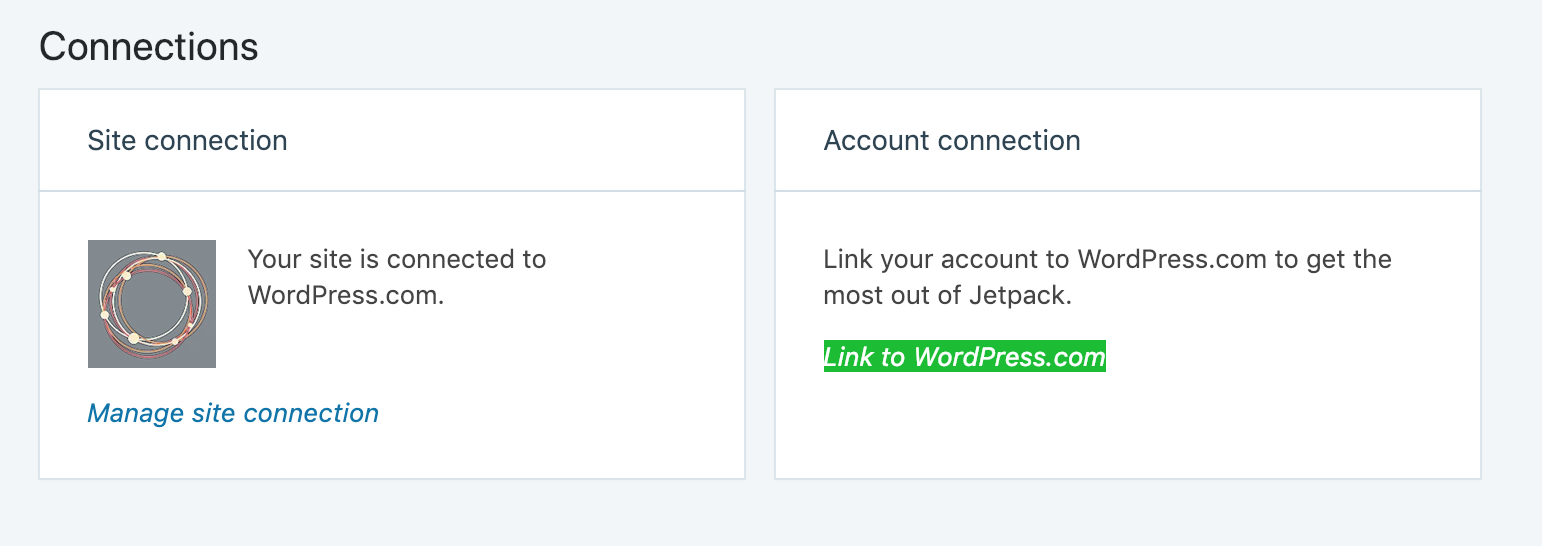
#### Potential changes?
The easiest solution that comes to mind is to put an adjective before "account":
> Connect your wordpress.com account to get the most out of Jetpack
or
> Connect your example.org (Local WordPress) account to get the most out of Jetpack
If the user isn't logged into WordPress.com or Jetpack.com, does the "Connect your account..." banner even need to be displayed?
Contributor guide
Research direction
Start at the Jetpack dashboard and settings entry points named in the issue and trace the banner showing “Connect your account to get the most out of Jetpack.” Determine how the site connection differs from the current user’s account connection; done means the banner wording and display behavior make that distinction clear.
Written by the indexing model from the issue text.
Assessment
- Tech stack
- javascript, php, react, wordpress
- Domain
- authentication, frontend
- Issue type
- Feature
- Difficulty
- 3/5
- Estimated time
- 1-2 days
- Activity status
- Stale
- Clarity
- Mostly clear
- Newbie friendliness
- 35/100