Automattic / Automattic/jetpack
Related Posts: Clarify relation of legacy option to block
- Dominant language
- PHP
- Stars
- 1.8k
- Forks
- 898
- Avg merge
- 1d 18h
- Merged PRs (30d)
- 774
Description
We're currently claiming the following at `/wp-admin/admin.php?page=jetpack#/traffic`:
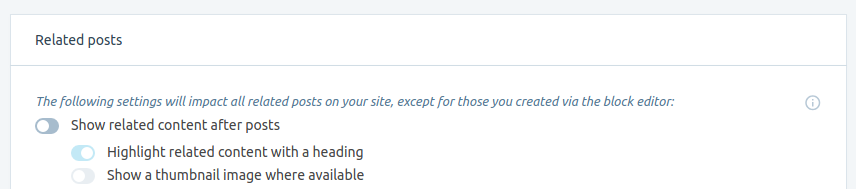
(per https://github.com/Automattic/jetpack/blob/9ba897d6b3c91817111de6a750b2fdb852788bcc/_inc/client/traffic/related-posts.jsx#L71)
However, disabling that setting causes Related Posts _blocks_ to disappear from the frontend as well.
#### Steps to reproduce the issue
1. Write a post, insert a Related Posts block, publish, view
2. Verify that it contains the related posts block on the fronted
3. Go to `/wp-admin/admin.php?page=jetpack#/traffic`
4. Disable the `Show related content after posts` toggle seen in the screenshot (this will disable the Related Posts module)
5. Reload the post
#### What I expected
The Related Posts block is gone
#### What happened instead
The Related Posts block to remain
#### Context
The reason is this line https://github.com/Automattic/jetpack/blob/9ba897d6b3c91817111de6a750b2fdb852788bcc/modules/related-posts/jetpack-related-posts.php#L737
which checks for `$options['enabled']`. While we do set it to `true` by default, i.e. if `$options['enabled']` isn't set, see https://github.com/Automattic/jetpack/blob/9ba897d6b3c91817111de6a750b2fdb852788bcc/modules/related-posts/jetpack-related-posts.php#L403-L404, this correctly doesn't change an explicit user-set `false` value to be overridden.
I found this on WP.com while testing D22588-code on a site that had the Related Posts setting switched off (from an earlier round of testing).
#### Possible solution
The simplest possible solution is to change the wording of https://github.com/Automattic/jetpack/blob/9ba897d6b3c91817111de6a750b2fdb852788bcc/_inc/client/traffic/related-posts.jsx#L71 to make clear that the top toggle actually impacts Related Posts blocks, too (as opposed to the other, layout-modifying toggles). Better yet, we should probably keep the `The following setting will impact all related posts on your site` part above the first toggle, and add a line `The following settings will not impact Related Posts block, whose layout you can control manually in the block editor` or so below that first toggle.
We might want to add something similar to the corresponding Calypso setting.
These might be some good first steps.
#### Further considerations
In general, our strategy has been to disable blocks if their corresponding modules are disabled, so it seems to make sense that this toggle will also disable Related Posts blocks.
To the user, that toggle has mostly visual implications -- it hides legacy Related Posts from the bottom of all pages.
This introduces the following problem: If a user only wants to display Related Posts by explciitly inserting them into posts (but not at the bottom of all posts, as the legacy functionality would), they will probably disable the toggle. That, however, will also cause the blocks to disappear. In other words, AFAICS we currently don't provide any way to achieve that kind of behavior.
/cc @tyxla
Contributor guide
Research direction
Start with _inc/client/traffic/related-posts.jsx at the referenced toggle text, then read modules/related-posts/jetpack-related-posts.php around the enabled checks. Review the related Calypso setting as well. Done means the settings clearly communicate whether the toggle affects legacy related posts and Related Posts blocks, with the intended behavior documented or clarified.
Written by the indexing model from the issue text.
Assessment
- Tech stack
- javascript, php, react, wordpress
- Domain
- frontend, web-dev
- Issue type
- Bug
- Difficulty
- 3/5
- Estimated time
- 1-2 days
- Activity status
- Stale
- Clarity
- Mostly clear
- Newbie friendliness
- 38/100